JSON / NDJSON TO JSON

NDJSON to JSON Converter

Parse newline-delimited JSON into a regular JSON array with one pass, locally in the browser. Processing happens locally in your browser, with no account and no uploads.

JSON formatting workbench

workspace.json — live session
INDENT
SORT
01 / RAW INPUT 0 LINES · 0 B
02 / FORMATTED OUTPUT 0 LINES · 0 B
Awaiting input ⌘/CTRL + ↵ TO FORMAT
RESULT / CONVERT
// Result will appear here
HOW IT WORKS

Assembling a stream back into a document.

Each non-empty line is parsed independently and the results are collected into an array. Blank lines are skipped, so a file ending in a newline — which is what every writer produces — does not become a null element.
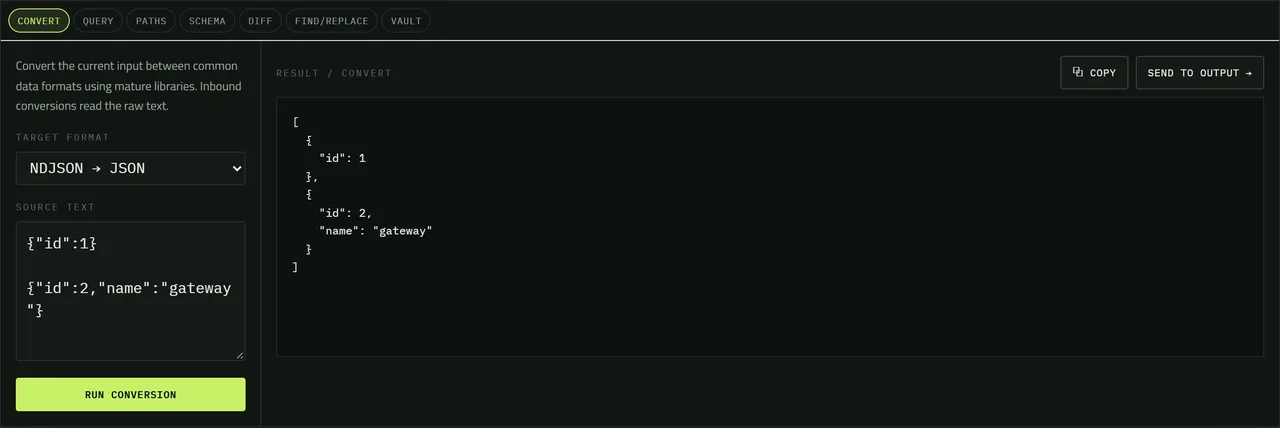
The converter assembling a two-record stream whose middle blank line is skipped: an array with id 1 and a second record carrying name gateway, no null element anywhere
Blank lines are skipped, so a trailing newline never becomes a null record

Why it fails, precisely

  • ▸The error names the line that broke, because a single malformed record does not corrupt the ones around it. That is the practical advantage over a pretty array, where one missing comma loses the whole file.
  • ▸A pretty-printed document fails on its first line, since [ alone is not a record. Minify it first, or convert it with the formatter.
  • ▸A truncated final line fails on its own and tells you where the writer stopped — useful when you are auditing a log that was cut off.
NDJSON
{"id":1}
{"id":2}
JSON
[
  { "id": 1 },
  { "id": 2 }
]

NOTE Once the records are an array, every other module applies to them: convert to CSV, generate a schema across all samples, or find the shape the records do not agree on. The NDJSON for log pipelines guide covers the shell side — splitting a stream safely, keeping a record pair together for bulk APIs, and what to do when one line is truncated.

What you get on this page

  • ▸Each non-empty line parsed as JSON
  • ▸Blank lines ignored automatically
  • ▸Invalid lines reported with an error
  • ▸Copy or download the resulting array

Because bracekit is a static application, this page loads quickly, caches well and never sends your data to a parsing server. Your formatting preferences, recent documents and snippets stay in local storage.

ANSWERS

NDJSON to JSON questions

How are the lines combined?

Every non-empty line is parsed as JSON and collected into an array in the same order.

Are blank lines a problem?

No. Empty and whitespace-only lines are skipped.

Does this run locally?

Yes. Your NDJSON never leaves the browser.

Is my JSON data uploaded to a server?

No. Parsing, formatting, conversion, validation and comparison all run in your browser with JavaScript. Your data is never transmitted, and history is stored only in your local storage.

Is bracekit free to use?

Yes. Every tool is free, requires no account and has no usage limits. Once a page has been visited, the offline cache lets it reopen without a connection; only the Google Fonts files need the network, and system fonts are used while you are offline.

TOOL MATRIX

Keep working

Keyboard shortcuts
FORMATTING
Format input Ctrl/⌘ + Enter
Toggle auto-format Ctrl/⌘ + Shift + A
CLIPBOARD & FILES
Copy output Ctrl/⌘ + K
Open JSON file Ctrl/⌘ + O
Download output Ctrl/⌘ + S
Save snippet Ctrl/⌘ + Shift + N
MODULES
Open find & replace Ctrl/⌘ + Shift + F
Lock / unlock output Ctrl/⌘ + Shift + L
Show this dialog Ctrl/⌘ + /
Local history
Save snippet
Erase local data

Nothing is stored in this browser yet.

Removes the saved draft, history, snippets and formatting options for this site. Documents you typed stay in the editor until the page reloads.