JSON / JSON VALIDATOR

JSON Validator Online

Check whether JSON is valid, find the exact line and column of syntax errors, and repair common problems locally in the browser. Processing happens locally in your browser, with no account and no uploads.

JSON formatting workbench

workspace.json — live session
INDENT
SORT
01 / RAW INPUT 0 LINES · 0 B
02 / FORMATTED OUTPUT 0 LINES · 0 B
Awaiting input ⌘/CTRL + ↵ TO FORMAT
RESULT / CONVERT
// Result will appear here
HOW IT WORKS

Validation that points at the character.

The validator calls JSON.parse first, so a well-formed document comes back valid with nothing rewritten. When parsing stops, the status bar carries the engine's message plus the line and column derived from the reported character offset — usually the difference between scanning a minified payload by eye and knowing the trouble is at line 3.

Two readings of the same input

  • ▸Strict — nothing is forgiven. Use it when the question is whether a file is legal JSON at all.
  • ▸Repair (default) — comments, trailing commas, bare keys, single quotes and Python literals are normalised before the parse, and each fix is named in the result so you can see what was actually wrong.

Valid is not the same as correct

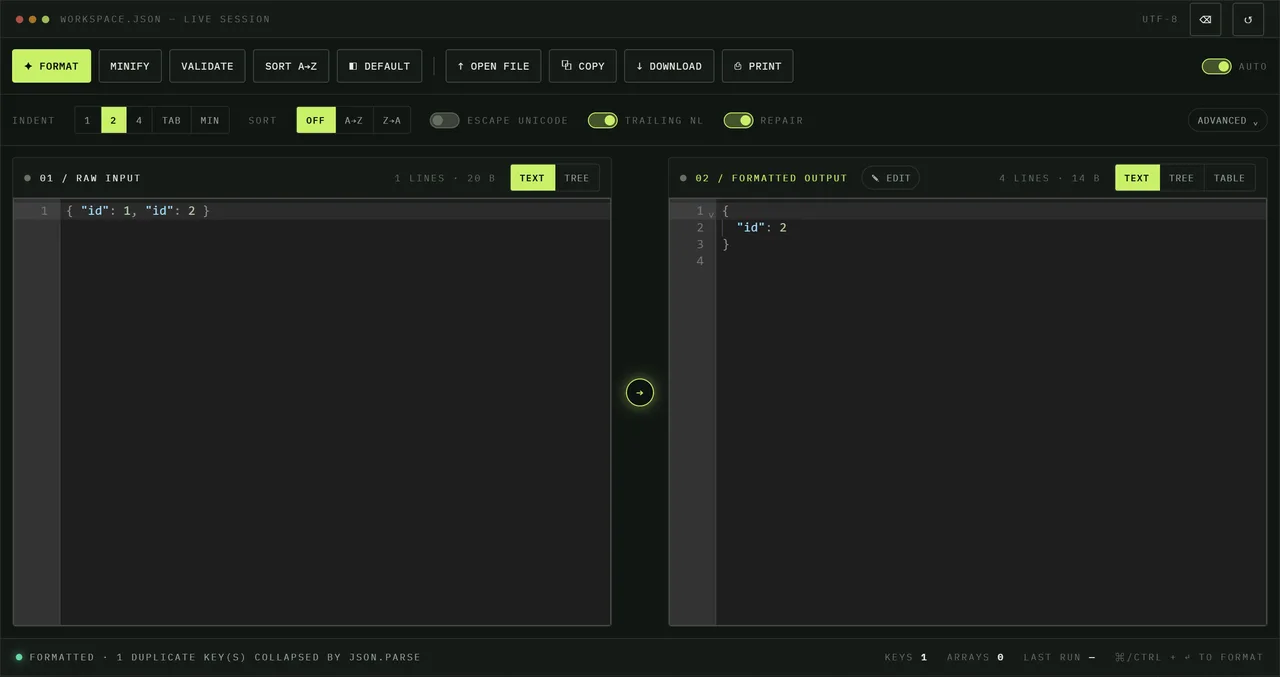
Two shapes parse without complaint and still cause defects, so they surface as warnings rather than errors: repeated keys, where JSON.parse silently keeps the last value, and integers outside the safe integer range, which silently round to the nearest value a double can hold — see JSON number precision.

Parses fine — one of these ids no longer exists
{
  "id": 1,
  "id": 2
}
The validator formatting a document that repeats one key: the output keeps only the second id, and the status bar reports one duplicate key collapsed by JSON.parse
The example above, run through the formatter on this page

What you get on this page

  • ▸Strict and repair-aware validation
  • ▸Line and column error locations
  • ▸Local processing with no uploads
  • ▸Tree view for inspecting valid documents

Because bracekit is a static application, this page loads quickly, caches well and never sends your data to a parsing server. Your formatting preferences, recent documents and snippets stay in local storage.

ANSWERS

JSON Validator questions

How does the JSON validator report errors?

The validator parses your input in the browser and reports the error message together with the exact line and column where parsing stopped.

Can it validate JSON with comments?

Yes. Leave Repair enabled and comments, trailing commas and bare keys are normalized before validation. Use Strict mode when you need standard JSON only.

Is the JSON I paste uploaded?

No. Validation is performed entirely by JavaScript in your browser, so sensitive payloads never leave your device.

Is my JSON data uploaded to a server?

No. Parsing, formatting, conversion, validation and comparison all run in your browser with JavaScript. Your data is never transmitted, and history is stored only in your local storage.

Is bracekit free to use?

Yes. Every tool is free, requires no account and has no usage limits. Once a page has been visited, the offline cache lets it reopen without a connection; only the Google Fonts files need the network, and system fonts are used while you are offline.

TOOL MATRIX

Keep working

Keyboard shortcuts
FORMATTING
Format input Ctrl/⌘ + Enter
Toggle auto-format Ctrl/⌘ + Shift + A
CLIPBOARD & FILES
Copy output Ctrl/⌘ + K
Open JSON file Ctrl/⌘ + O
Download output Ctrl/⌘ + S
Save snippet Ctrl/⌘ + Shift + N
MODULES
Open find & replace Ctrl/⌘ + Shift + F
Lock / unlock output Ctrl/⌘ + Shift + L
Show this dialog Ctrl/⌘ + /
Local history
Save snippet
Erase local data

Nothing is stored in this browser yet.

Removes the saved draft, history, snippets and formatting options for this site. Documents you typed stay in the editor until the page reloads.