JSON number precision: why big ids lose digits
25 NOVEMBER 2026 · 7 MIN READ
A JSON number is a double, not digits. Above 2^53 consecutive integers stop existing, and the rewrite happens during parsing — before a formatter, validator or converter can show you anything.
RFC 8259 says almost nothing about numbers: it defines the syntax and then hands the semantics to "an IEEE 754 double", noting that implementations may vary. That one sentence is responsible for a steady stream of wrong ids, corrupt totals and invoices that differ by a cent. The syntax is fine. The value underneath it is not what you typed.
Before and after a parse
in  {"id":12345678901234567890,"edge":9007199254740993,"neg":-0,"dec":1.0,"huge":1e500,"safe":9007199254740991}
out {"id":12345678901234567000,"edge":9007199254740992,"neg":0,"dec":1,"huge":null,"safe":9007199254740991}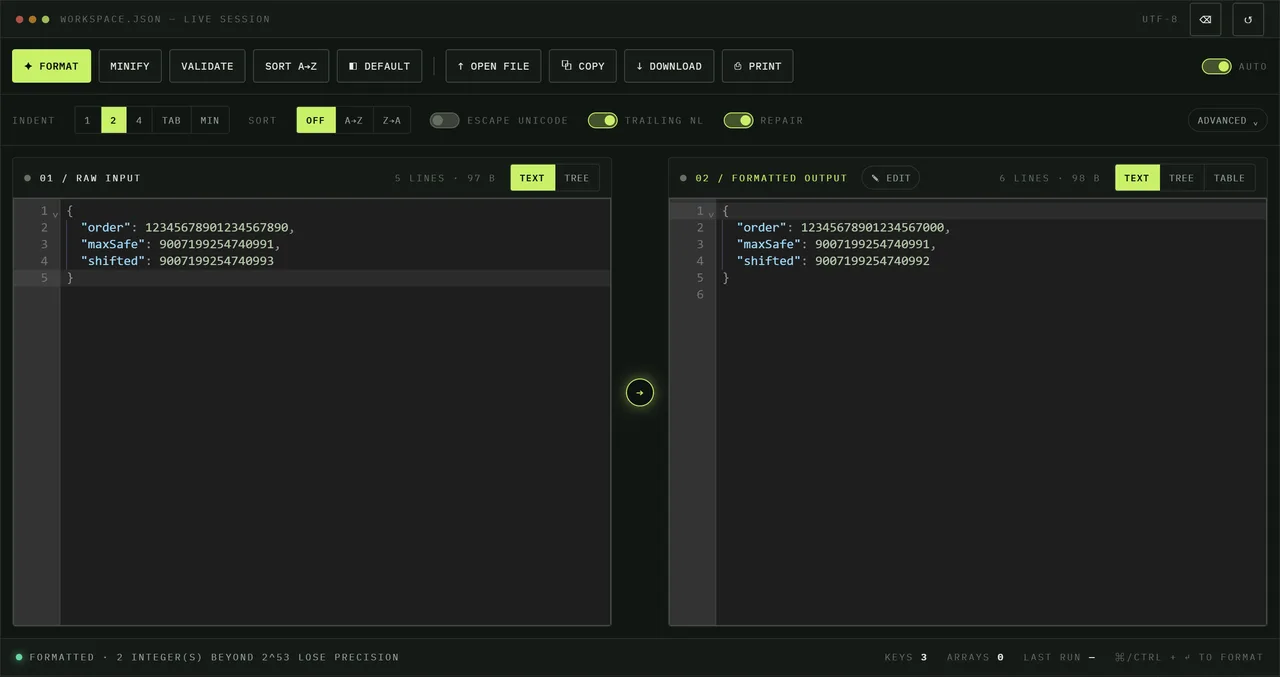
Nothing was rejected. The document is valid JSON on both sides of that arrow. A double carries 53 bits of mantissa, so integers are exact only up to 9007199254740991 — Number.MAX_SAFE_INTEGER in JavaScript, 2^53 - 1. Past that point the representable values are further apart than 1, and the reader snaps your input to the nearest one it can hold.
Field by field
| Written | You get | Why |
|---|---|---|
12345678901234567890 | 12345678901234567000 | rounded to the nearest representable double; the last three digits were never stored |
9007199254740993 | 9007199254740992 | one past MAX_SAFE_INTEGER, where only even integers exist |
-0 | 0 | negative zero survives in the hardware but JSON.stringify prints it without the sign |
1.0 | 1 | JSON has no float/int distinction, so the formatting that told them apart is gone |
1e500 | null | it parses to Infinity, and infinity has no JSON spelling, so serialisation replaces it |
1e21 | 1e+21 | exact, only re-spelled — the printer switches to exponential form at 21 digits |
0.1 | 0.1 | looks safe because printers round-trip short decimals; arithmetic on it is not: 0.1 + 0.2 is 0.30000000000000004 |
Which fields belong in quotes
- ▸Distributed ids. Snowflake, Discord, Twitter/X and most ULID-adjacent schemes hand out 18–19 digit values, which is exactly the range where doubles start lying.
- ▸Nanosecond and microsecond timestamps. Epoch nanoseconds passed 2^53 in 2011 and are now around 1.7e18.
- ▸Anything with a leading zero. A zip code, an extension, a bank account segment. Precision is not even the issue; the zero is simply not part of a number.
- ▸Version-like values.
1.10and1.1are the same number and different versions. - ▸Barcodes and card numbers. EAN-13 fits inside the safe range but is still an identifier with a check digit computed over the digits, not the value.
- ▸Fixed-point money. Either use strings or integer minor units, because binary floating point cannot represent 0.05 exactly.
Where the damage can be undone
It cannot be undone after parsing, in this tool or any other that uses JSON.parse. Every module here — tree view, validator, schema inference, converters, diff — reads the parsed value, so by the time you see a tree the tail is already gone. That is worth stating plainly, because the usual hope is that some display mode will show the original text. The one place a long digit string does survive is CSV import: a cell only becomes a number when the result stays inside ±2^53, so 12345678901234567890 is left as text — while 007 is comfortably inside that range and becomes 7.
Fixing it upstream
- 01 Serialise identifiers as strings at the producer. In Python that means
json.dumps(obj, default=str)for ids you know about; in JavaScript aMapofBigIntfields that you convert explicitly; in Go astringtag or a custom marshaler. - 02 Declare them as strings in the schema, so the mistake is caught rather than shipped.
{ "type": "string", "pattern": "^[0-9]+$" }costs nothing and documents intent. - 03 If you do not control the producer, parse with a big-number-aware reader before it reaches a browser —
json-bigintorlossless-jsonin JavaScript,json.loads(..., parse_int=Decimal)in Python — and keep the digits as text from that point on. - 04 When the payload is already on disk and only a handful of fields matter, edit the text rather than the value: quote the digits first with
sedor a PowerShell replace, then paste the result here. Once it has been through a JSON parser, the original characters are not recoverable. - 05
JSON.stringifyrefuses aBigIntoutright with Do not know how to serialize a BigInt. That error is a gift: it fails loudly instead of silently rounding, which is why9007199254740993nis worth using when you have the choice.
Catching drift you already have
Two exports that should differ only in ordering will look identical if both lost the same digits, and the comparator cannot tell you why — it compares values, not text. When an id mismatch is suspected, diff the raw payloads as plain text before parsing them, then use the validator to confirm the document is at least well formed. If a field must be text, infer a schema from a known-good file and check the suspect file against it: an id that came back as a number is a type error, and type errors are the one thing inference does surface. The formatter is still useful at the end of that chain, because seeing 12345678901234567000 in the tree is the fastest proof that the digits are already gone.
NOTE The expensive case is a document that parses cleanly. A syntax error stops the pipeline; a rounded identifier flows through to a database write and turns up weeks later as a support ticket. Treat any unquoted numeric id in a JSON payload as a bug you have not found yet.