JSON / JSON VIEWER

JSON Viewer & Tree Explorer

Explore large JSON documents with a collapsible tree, table view, path explorer and full JSONPath queries — all in your browser. Processing happens locally in your browser, with no account and no uploads.

JSON formatting workbench

workspace.json — live session
INDENT
SORT
01 / RAW INPUT 0 LINES · 0 B
02 / FORMATTED OUTPUT 0 LINES · 0 B
Awaiting input ⌘/CTRL + ↵ TO FORMAT
RESULT / CONVERT
// Result will appear here
HOW IT WORKS

Reading a document instead of scrolling through one.

Both panes stay live. The left side is the source you can edit; the right side is the same value rendered for reading, in whichever of the three views suits the shape in front of you. Nothing is uploaded, so a multi-megabyte response opens as fast as the browser can parse it.

ViewReach for it whenWhat you get
TextYou need to edit or compare by eyeFormatted source with the indentation and line endings you picked
TreeThe payload nests deeplyCollapsible branches with typed values
TableThe root is an array of recordsOne row per element, one column per key

Locating a value

The Paths module flattens the document into a filterable list of leaf paths such as $.services[0].port, which answers "where does this key live" faster than writing an expression. When you need a condition instead — only the entries where a field matches — switch to the Query module and run a JSONPath expression over the same parsed value.
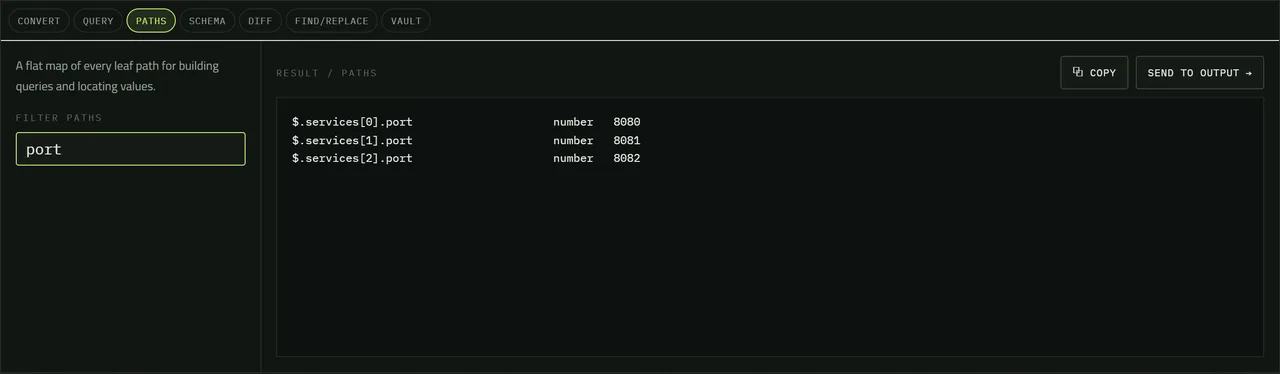
The Paths module listing every leaf path containing port: $.services[0].port, $.services[1].port and $.services[2].port, each typed as number with its value
The Paths module with a three-letter filter answering "where does this live"

NOTE The node, depth, key and array counts under the editors come from one guarded traversal. A pathologically nested document reports a depth limit rather than freezing the tab.

What you get on this page

  • ▸Text, tree and table editor modes
  • ▸Collapsible nodes and expand/collapse all
  • ▸Flattened path explorer for nested values
  • ▸JSONPath queries with filters and wildcards

Because bracekit is a static application, this page loads quickly, caches well and never sends your data to a parsing server. Your formatting preferences, recent documents and snippets stay in local storage.

ANSWERS

JSON Viewer questions

Can I view very large JSON files?

The editor is designed for large documents. Open a local file or paste your JSON, then switch to tree or table view to navigate it.

How do I find a value deep in the document?

Use the Paths module to filter every leaf path, or the Query module to run a JSONPath expression such as $..email.

Does the viewer change my JSON?

Formatting rules are configurable, but parsing and viewing happen locally. You decide whether to copy or download the result.

Is my JSON data uploaded to a server?

No. Parsing, formatting, conversion, validation and comparison all run in your browser with JavaScript. Your data is never transmitted, and history is stored only in your local storage.

Is bracekit free to use?

Yes. Every tool is free, requires no account and has no usage limits. Once a page has been visited, the offline cache lets it reopen without a connection; only the Google Fonts files need the network, and system fonts are used while you are offline.

TOOL MATRIX

Keep working

Keyboard shortcuts
FORMATTING
Format input Ctrl/⌘ + Enter
Toggle auto-format Ctrl/⌘ + Shift + A
CLIPBOARD & FILES
Copy output Ctrl/⌘ + K
Open JSON file Ctrl/⌘ + O
Download output Ctrl/⌘ + S
Save snippet Ctrl/⌘ + Shift + N
MODULES
Open find & replace Ctrl/⌘ + Shift + F
Lock / unlock output Ctrl/⌘ + Shift + L
Show this dialog Ctrl/⌘ + /
Local history
Save snippet
Erase local data

Nothing is stored in this browser yet.

Removes the saved draft, history, snippets and formatting options for this site. Documents you typed stay in the editor until the page reloads.