JSON / JSON SCHEMA

JSON Schema Generator & Validator

Infer a draft 2020-12 JSON Schema from a sample document and validate documents against a schema with Ajv. Processing happens locally in your browser, with no account and no uploads.

JSON formatting workbench

workspace.json — live session
INDENT
SORT
01 / RAW INPUT 0 LINES · 0 B
02 / FORMATTED OUTPUT 0 LINES · 0 B
Awaiting input ⌘/CTRL + ↵ TO FORMAT
RESULT / CONVERT
// Result will appear here
HOW IT WORKS

A schema you can hand to a validator.

Inference emits JSON Schema draft 2020-12: a title, a type per node, properties and required for objects, and an items schema merged across every element of an array.

The rules it follows

  • ▸A whole number becomes integer, a fractional one becomes number. Note that 2.0 and 2 are the same JSON number, which is another argument for keeping version-like values in strings.
  • ▸Strings are inspected for format: email-shaped text gets email, a URL gets uri, and an ISO stamp gets date or date-time.
  • ▸Array elements are generalised together, so a list of records yields one item schema whose required list is the intersection of the keys every element has.
  • ▸An empty array becomes { "type": "array", "items": {} } — no claim about contents it has never seen.

For a single object, required lists every key, because one document cannot prove that any field is optional. Paste an array of records instead of one object, or mark the optional ones by hand.

Then validate against it

The schema panel runs Ajv over the current document with all errors enabled, so a mismatch reports every failing path rather than stopping at the first. Ajv is loaded against the draft named in $schema, which is why a generated 2020-12 document validates instead of being refused for speaking a dialect the validator did not pick up. Copy the schema into a test and the same check runs in CI without a browser. What a sample can and cannot prove is set out in the schema-from-sample guide.
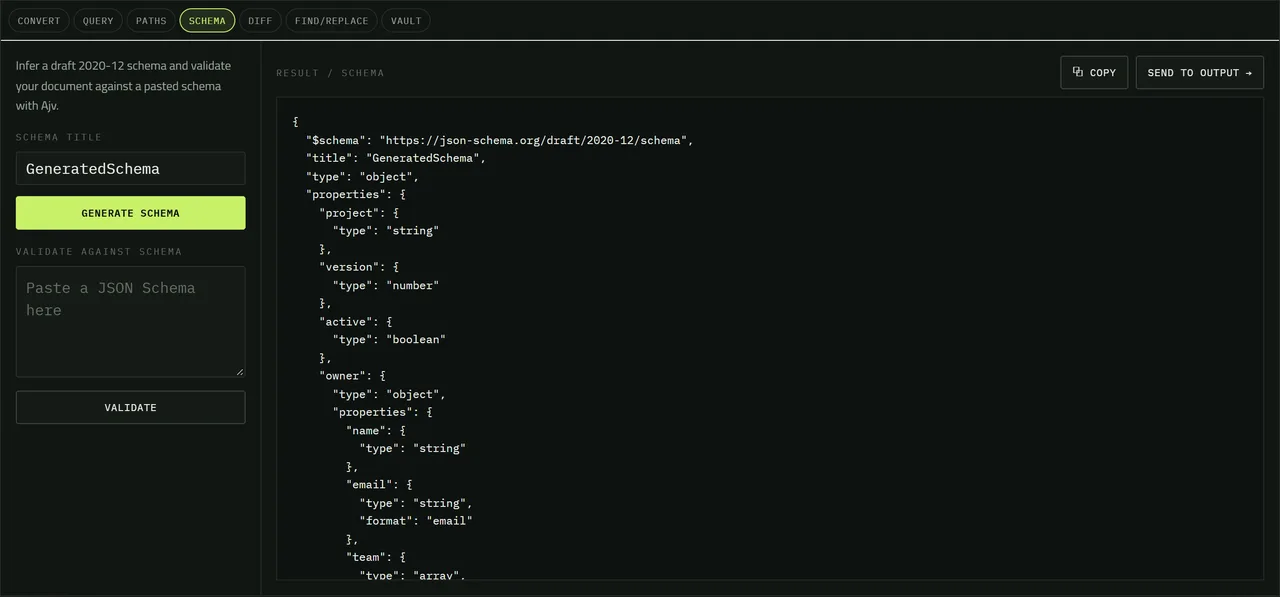
The generated schema for the sample document: owner.email typed as string with format email, the fractional version typed as number and the ports typed as integer, all under a 2020-12 $schema
GENERATE SCHEMA over the sample: formats, integers and fractions all distinguished

What you get on this page

  • ▸Draft 2020-12 schema inference
  • ▸Required fields and type detection
  • ▸String format detection for email, URI and dates
  • ▸Schema validation powered by Ajv

Because bracekit is a static application, this page loads quickly, caches well and never sends your data to a parsing server. Your formatting preferences, recent documents and snippets stay in local storage.

ANSWERS

JSON Schema questions

What schema version is generated?

The generator emits a JSON Schema draft 2020-12 document with inferred types, required fields and item schemas.

Can I validate against my own schema?

Yes. Paste a schema into the Validate Against Schema box and click Validate; Ajv reports all errors.

Are string formats detected?

Common formats such as email, URI, date and date-time are detected when your sample values match them.

Is my JSON data uploaded to a server?

No. Parsing, formatting, conversion, validation and comparison all run in your browser with JavaScript. Your data is never transmitted, and history is stored only in your local storage.

Is bracekit free to use?

Yes. Every tool is free, requires no account and has no usage limits. Once a page has been visited, the offline cache lets it reopen without a connection; only the Google Fonts files need the network, and system fonts are used while you are offline.

TOOL MATRIX

Keep working

Keyboard shortcuts
FORMATTING
Format input Ctrl/⌘ + Enter
Toggle auto-format Ctrl/⌘ + Shift + A
CLIPBOARD & FILES
Copy output Ctrl/⌘ + K
Open JSON file Ctrl/⌘ + O
Download output Ctrl/⌘ + S
Save snippet Ctrl/⌘ + Shift + N
MODULES
Open find & replace Ctrl/⌘ + Shift + F
Lock / unlock output Ctrl/⌘ + Shift + L
Show this dialog Ctrl/⌘ + /
Local history
Save snippet
Erase local data

Nothing is stored in this browser yet.

Removes the saved draft, history, snippets and formatting options for this site. Documents you typed stay in the editor until the page reloads.