JSON / JSON TO TYPESCRIPT

JSON to TypeScript Interface Generator

Turn a JSON sample into a TypeScript interface with inferred types, nested objects and union arrays. Processing happens locally in your browser, with no account and no uploads.

JSON formatting workbench

workspace.json — live session
INDENT
SORT
01 / RAW INPUT 0 LINES · 0 B
02 / FORMATTED OUTPUT 0 LINES · 0 B
Awaiting input ⌘/CTRL + ↵ TO FORMAT
RESULT / CONVERT
// Result will appear here
HOW IT WORKS

Types inferred from evidence — edit them deliberately.

A non-empty object at the root becomes export interface Root. Anything else becomes a type alias, because an interface body must be an object literal. Keys that are not legal identifiers are quoted.

Input
{
  "id": 1,
  "tags": ["a"],
  "mixed": [1, "x"],
  "meta": { "ok": true }
}
Output
export interface Root {
  id: number
  tags: string[]
  mixed: (number | string)[]
  meta: {
    ok: boolean
  }
}
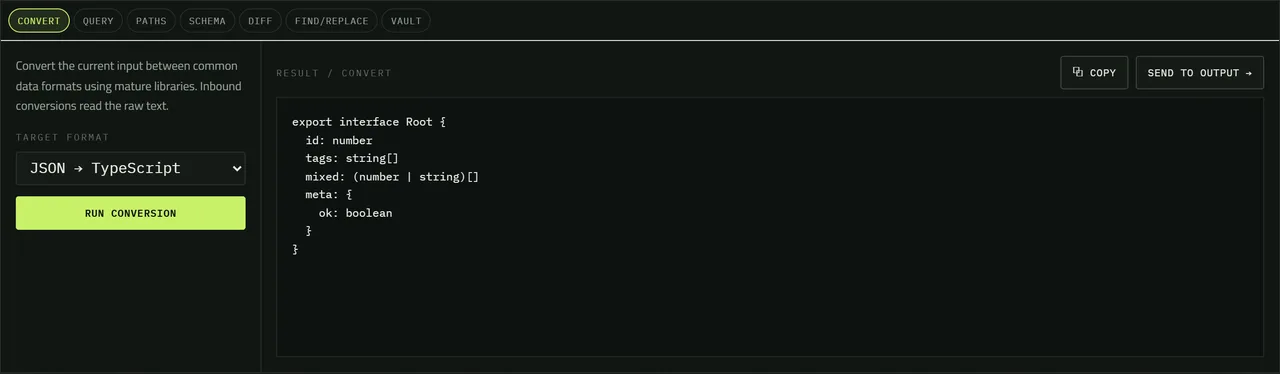
The type generator emitting export interface Root from the example: id as number, tags as string[], the mixed array as a number-string union and the nested meta object inline
The example above, types inferred and the union spelled out

What a single sample cannot show

  • ▸Every property comes back required. One document cannot prove a field is sometimes absent, so mark those with ? yourself.
  • ▸An empty array becomes unknown[] and an empty object Record<string, never>: honest, and both worth replacing.
  • ▸String values stay string. If a field carries an enum, write the union of its values by hand or the type will accept anything.
  • ▸Feed an array of records and the element type becomes a union of the observed shapes, so a field present in only some records appears as a separate variant rather than an optional property.

NOTE The exported type is always named Root; rename it once in your editor. Nested objects stay inline, which keeps the output small enough to review — extract them into named interfaces when the shape is reused.

What you get on this page

  • ▸Infers string, number, boolean and null
  • ▸Nested objects become inline interfaces
  • ▸Mixed arrays become union types
  • ▸Invalid property names are quoted automatically

Because bracekit is a static application, this page loads quickly, caches well and never sends your data to a parsing server. Your formatting preferences, recent documents and snippets stay in local storage.

ANSWERS

JSON to TypeScript questions

What types are generated?

Strings, numbers, booleans and null map directly. Objects become inline shapes and arrays use union element types.

Can I choose the interface name?

The generator exports an interface named Root by default. You can edit the name after copying the output.

Are optional fields detected?

No. The generator describes the exact sample you provide; it does not guess which fields might be absent.

Is my JSON data uploaded to a server?

No. Parsing, formatting, conversion, validation and comparison all run in your browser with JavaScript. Your data is never transmitted, and history is stored only in your local storage.

Is bracekit free to use?

Yes. Every tool is free, requires no account and has no usage limits. Once a page has been visited, the offline cache lets it reopen without a connection; only the Google Fonts files need the network, and system fonts are used while you are offline.

TOOL MATRIX

Keep working

Keyboard shortcuts
FORMATTING
Format input Ctrl/⌘ + Enter
Toggle auto-format Ctrl/⌘ + Shift + A
CLIPBOARD & FILES
Copy output Ctrl/⌘ + K
Open JSON file Ctrl/⌘ + O
Download output Ctrl/⌘ + S
Save snippet Ctrl/⌘ + Shift + N
MODULES
Open find & replace Ctrl/⌘ + Shift + F
Lock / unlock output Ctrl/⌘ + Shift + L
Show this dialog Ctrl/⌘ + /
Local history
Save snippet
Erase local data

Nothing is stored in this browser yet.

Removes the saved draft, history, snippets and formatting options for this site. Documents you typed stay in the editor until the page reloads.