JSON / JSON TO YAML

JSON to YAML Converter

Convert JSON to readable YAML with js-yaml, locally and instantly. Ideal for configuration files and deployment manifests. Processing happens locally in your browser, with no account and no uploads.

JSON formatting workbench

workspace.json — live session
INDENT
SORT
01 / RAW INPUT 0 LINES · 0 B
02 / FORMATTED OUTPUT 0 LINES · 0 B
Awaiting input ⌘/CTRL + ↵ TO FORMAT
RESULT / CONVERT
// Result will appear here
HOW IT WORKS

From one unambiguous format to the readable one.

Conversion runs through js-yaml with two-space indentation, line wrapping disabled and references turned off, so nothing is collapsed into an anchor you have to resolve by hand. If the library is unavailable, the built-in writer emits the same block structure locally.

JSONYAML
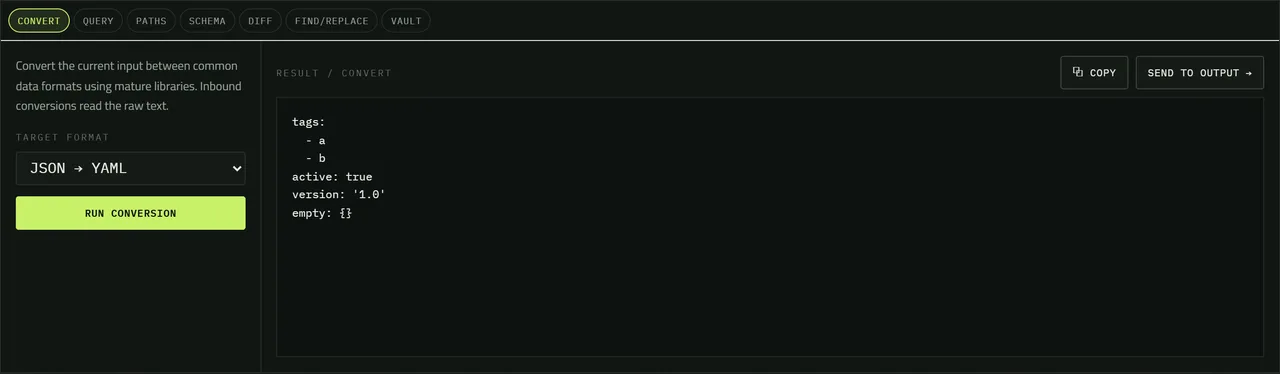
{ "tags": ["a", "b"] }tags: followed by - a and - b
{ "active": true }active: true
{ "version": "1.0" }version: '1.0' — quoted, so it stays a string
{ "empty": {} }empty: {}
The converter writing YAML: tags as a two-item block list, active: true, the version quoted as 1.0 so it stays a string, and empty: {}
The conversion table above, produced by the page itself

What YAML cannot carry

  • ▸One number type becomes two. JSON has a single number; YAML separates integer from float, so 1 and 1.0 are different scalars on the way back.
  • ▸There is no null keyword conflict to worry about: null is written as null, and both ~ and null read back as null.
  • ▸Words that mean booleans in YAML 1.1 — yes, no, on, off — are quoted on output, precisely so an older parser does not turn the string into true.

NOTE Tabs are not indentation in YAML. Paste the output into an editor that swaps leading spaces for tabs and the document stops parsing.

What you get on this page

  • ▸Powered by js-yaml
  • ▸Nested objects and arrays supported
  • ▸Copy or download the YAML result
  • ▸No server-side conversion

Because bracekit is a static application, this page loads quickly, caches well and never sends your data to a parsing server. Your formatting preferences, recent documents and snippets stay in local storage.

ANSWERS

JSON to YAML questions

Is the conversion accurate?

The converter uses js-yaml, a mature YAML library, to serialize the parsed JSON structure.

Can I convert YAML back to JSON?

Yes. Open the workbench, choose the Convert module and select YAML → JSON.

Does it support large configuration files?

Yes. Processing happens in your browser and the result can be copied or downloaded directly.

Is my JSON data uploaded to a server?

No. Parsing, formatting, conversion, validation and comparison all run in your browser with JavaScript. Your data is never transmitted, and history is stored only in your local storage.

Is bracekit free to use?

Yes. Every tool is free, requires no account and has no usage limits. Once a page has been visited, the offline cache lets it reopen without a connection; only the Google Fonts files need the network, and system fonts are used while you are offline.

TOOL MATRIX

Keep working

Keyboard shortcuts
FORMATTING
Format input Ctrl/⌘ + Enter
Toggle auto-format Ctrl/⌘ + Shift + A
CLIPBOARD & FILES
Copy output Ctrl/⌘ + K
Open JSON file Ctrl/⌘ + O
Download output Ctrl/⌘ + S
Save snippet Ctrl/⌘ + Shift + N
MODULES
Open find & replace Ctrl/⌘ + Shift + F
Lock / unlock output Ctrl/⌘ + Shift + L
Show this dialog Ctrl/⌘ + /
Local history
Save snippet
Erase local data

Nothing is stored in this browser yet.

Removes the saved draft, history, snippets and formatting options for this site. Documents you typed stay in the editor until the page reloads.