JSON has one shape for everything; XML has three.
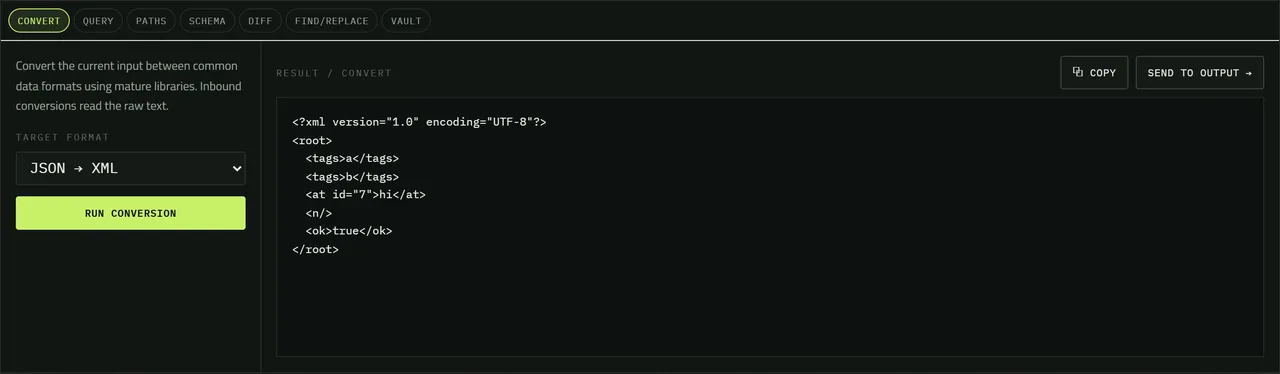
Output is wrapped in a root element and formatted. An array repeats its tag, an object nests, a scalar becomes element text, and a key beginning with @ becomes an attribute instead of a child element.
| JSON | XML |
|---|---|
"tags": ["a", "b"] | <tags>a</tags> <tags>b</tags> |
"at": { "@id": 7, "#text": "hi" } | <at id="7">hi</at> |
"n": null | an empty element: <n/> |
"ok": true | <ok>true</ok> — text, not a boolean type |
Names decide whether the result is usable
- ▸An element name cannot contain a space or start with a digit. Keys like
bad keyare written verbatim by the library and become markup that will not parse, so rename them first; the built-in fallback replaces an illegal name withiteminstead. - ▸XML does not distinguish "one element" from "a list of one", so a single-item array and a scalar produce the same document.
- ▸JSON has no namespace concept, so a prefixed element only appears if your keys already carry the prefix.
NOTE Round-tripping JSON → XML → JSON will not always return the keys you started with. Treat this as a one-way export unless the receiving system is the one that defines the shape.
What you get on this page
- ▸Powered by fast-xml-parser
- ▸Attributes and text nodes preserved on import
- ▸XML escaping handled automatically
- ▸Reverse XML → JSON conversion
Because bracekit is a static application, this page loads quickly, caches well and never sends your data to a parsing server. Your formatting preferences, recent documents and snippets stay in local storage.