JSON / JSON TO CSV

JSON to CSV Converter

Flatten JSON arrays into CSV using PapaParse, with dot notation for nested fields and proper escaping for commas and quotes. Processing happens locally in your browser, with no account and no uploads.

JSON formatting workbench

workspace.json — live session
INDENT
SORT
01 / RAW INPUT 0 LINES · 0 B
02 / FORMATTED OUTPUT 0 LINES · 0 B
Awaiting input ⌘/CTRL + ↵ TO FORMAT
RESULT / CONVERT
// Result will appear here
HOW IT WORKS

A document is not a table — here is the mapping.

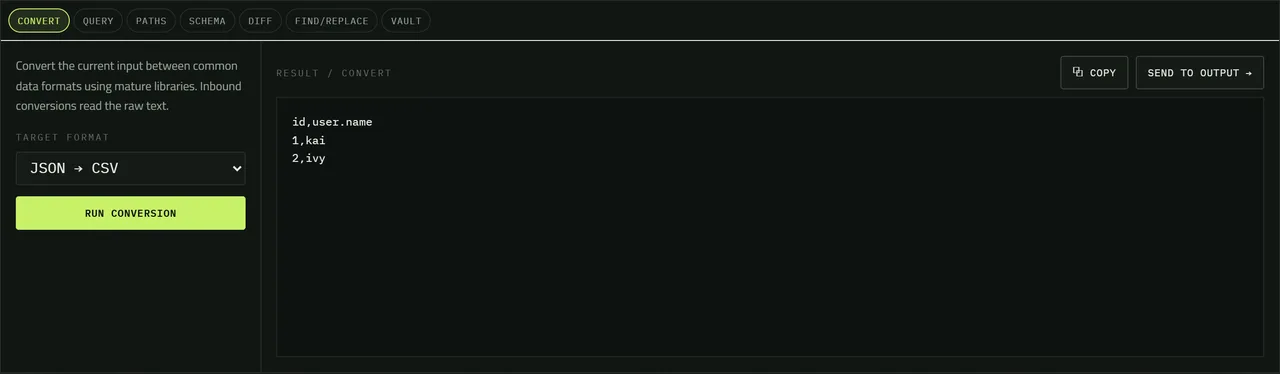
The root should be an array of objects, one record per line. Nested objects are flattened into dotted column names, so a mostly flat document converts cleanly and a deeply nested one produces a wide, sparse header row.

Input
[
  { "id": 1, "user": { "name": "kai" } },
  { "id": 2, "user": { "name": "ivy" } }
]
Output
id,user.name
1,kai
2,ivy
The converter flattening two records into CSV: a user.name column header with 1,kai on the first row and 2,ivy on the second
The nested example above, one dotted column per leaf

Where the shape breaks

  • ▸Arrays are not spread across columns. The library path joins their items into a single cell, the built-in fallback writes them as JSON text — either way the value does not come back as an array.
  • ▸A key present in only some records still becomes a column, and the rows missing it get an empty cell.
  • ▸Types are lost on the round trip: 42 and "42" are the same three characters in a cell, and line endings are written as CRLF because that is what spreadsheet software expects.

NOTE CSV holds one table. An order with its line items needs either a foreign-key column and a second file, or a format that nests — which is the reason this page also offers JSON to NDJSON.

What you get on this page

  • ▸Powered by PapaParse
  • ▸Nested objects flattened with dot notation
  • ▸Correct quoting for commas and newlines
  • ▸Reverse CSV → JSON conversion available

Because bracekit is a static application, this page loads quickly, caches well and never sends your data to a parsing server. Your formatting preferences, recent documents and snippets stay in local storage.

ANSWERS

JSON to CSV questions

What JSON shape works best?

An array of objects converts best. Each object becomes a CSV row and the union of keys becomes the header.

How are nested objects handled?

Nested object paths are flattened with dot notation, for example owner.name.

Can I convert CSV back to JSON?

Yes. In the Convert module select CSV → JSON; PapaParse handles quoted fields and type inference.

Is my JSON data uploaded to a server?

No. Parsing, formatting, conversion, validation and comparison all run in your browser with JavaScript. Your data is never transmitted, and history is stored only in your local storage.

Is bracekit free to use?

Yes. Every tool is free, requires no account and has no usage limits. Once a page has been visited, the offline cache lets it reopen without a connection; only the Google Fonts files need the network, and system fonts are used while you are offline.

TOOL MATRIX

Keep working

Keyboard shortcuts
FORMATTING
Format input Ctrl/⌘ + Enter
Toggle auto-format Ctrl/⌘ + Shift + A
CLIPBOARD & FILES
Copy output Ctrl/⌘ + K
Open JSON file Ctrl/⌘ + O
Download output Ctrl/⌘ + S
Save snippet Ctrl/⌘ + Shift + N
MODULES
Open find & replace Ctrl/⌘ + Shift + F
Lock / unlock output Ctrl/⌘ + Shift + L
Show this dialog Ctrl/⌘ + /
Local history
Save snippet
Erase local data

Nothing is stored in this browser yet.

Removes the saved draft, history, snippets and formatting options for this site. Documents you typed stay in the editor until the page reloads.