JSON / BASE64 TO JSON

Base64 to JSON Decoder

Decode a Base64 string into readable JSON, with UTF-8 decoding and instant validation in your browser. Processing happens locally in your browser, with no account and no uploads.

JSON formatting workbench

workspace.json — live session
INDENT
SORT
01 / RAW INPUT 0 LINES · 0 B
02 / FORMATTED OUTPUT 0 LINES · 0 B
Awaiting input ⌘/CTRL + ↵ TO FORMAT
RESULT / CONVERT
// Result will appear here
HOW IT WORKS

Decoding, then reading what is really there.

The text is decoded from base64 into bytes, interpreted as UTF-8 and parsed. Standard and URL-safe alphabets both work, whitespace and line breaks inside the input are ignored, and missing padding is added, so a value copied out of a query string decodes without editing.
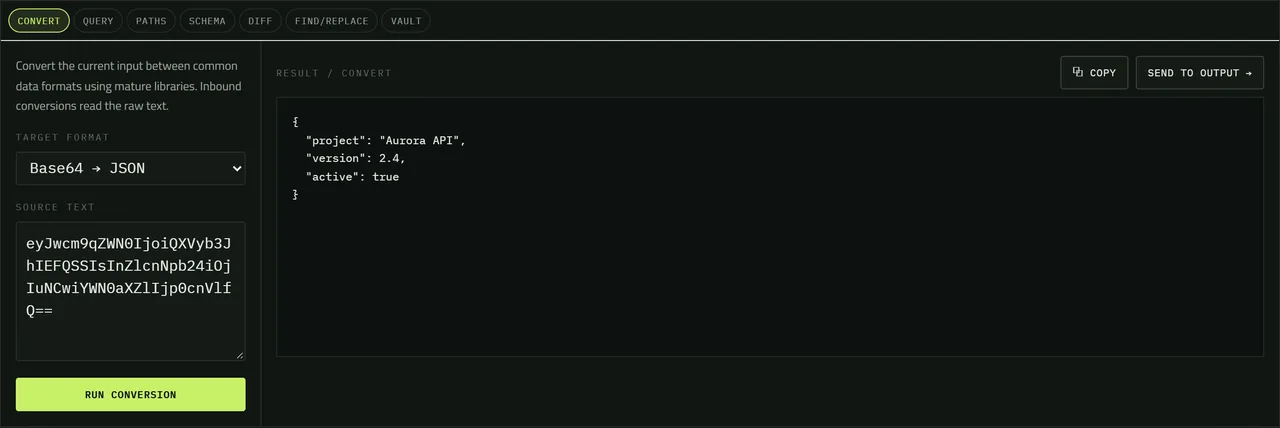
The decoder reading the base64 payload that ships in the SOURCE box back into a three-key JSON object with the project name, version and active flag
The payload above, decoded locally into the object it was

What a failure usually means

  • ▸Invalid character — the input was never base64, or it arrived percent-encoded (%2B) and needs decoding first.
  • ▸Unexpected end of JSON input — the payload was truncated, typically by a copy out of a log line.
  • ▸Unexpected token at position 0 — the bytes are not JSON at all; base64 also carries images, CSV and gzip blobs.
  • ▸Something readable but not JSON — the text was double-encoded, so decode it twice.

NOTE Decoding happens locally, which is the point: a token pasted into this page has no reason to visit a server, and there is no server to visit.

What you get on this page

  • ▸UTF-8 safe decoding with TextDecoder
  • ▸Paste Base64 and get formatted JSON
  • ▸Invalid input reported immediately
  • ▸Send the decoded value straight to the output pane

Because bracekit is a static application, this page loads quickly, caches well and never sends your data to a parsing server. Your formatting preferences, recent documents and snippets stay in local storage.

ANSWERS

Base64 to JSON questions

What Base64 input is accepted?

Paste a standard Base64 string that encodes a JSON document. Whitespace around the string is ignored.

What if the decoded text is not JSON?

The decoder parses the decoded text as JSON and reports the parsing error instead of showing a misleading result.

Can I encode JSON back to Base64?

Yes. Choose JSON → Base64 in the Convert module.

Is my JSON data uploaded to a server?

No. Parsing, formatting, conversion, validation and comparison all run in your browser with JavaScript. Your data is never transmitted, and history is stored only in your local storage.

Is bracekit free to use?

Yes. Every tool is free, requires no account and has no usage limits. Once a page has been visited, the offline cache lets it reopen without a connection; only the Google Fonts files need the network, and system fonts are used while you are offline.

TOOL MATRIX

Keep working

Keyboard shortcuts
FORMATTING
Format input Ctrl/⌘ + Enter
Toggle auto-format Ctrl/⌘ + Shift + A
CLIPBOARD & FILES
Copy output Ctrl/⌘ + K
Open JSON file Ctrl/⌘ + O
Download output Ctrl/⌘ + S
Save snippet Ctrl/⌘ + Shift + N
MODULES
Open find & replace Ctrl/⌘ + Shift + F
Lock / unlock output Ctrl/⌘ + Shift + L
Show this dialog Ctrl/⌘ + /
Local history
Save snippet
Erase local data

Nothing is stored in this browser yet.

Removes the saved draft, history, snippets and formatting options for this site. Documents you typed stay in the editor until the page reloads.