JSON / FIND & REPLACE

JSON Find & Replace Online

Find and replace text inside JSON keys and string values with plain text or regular expressions, entirely in your browser. Processing happens locally in your browser, with no account and no uploads.

JSON formatting workbench

workspace.json — live session
INDENT
SORT
01 / RAW INPUT 0 LINES · 0 B
02 / FORMATTED OUTPUT 0 LINES · 0 B
Awaiting input ⌘/CTRL + ↵ TO FORMAT
RESULT / CONVERT
// Result will appear here
HOW IT WORKS

A replace that reports what it touched.

The module walks every string in the parsed document. Values are matched by default, keys as well when you switch them on, and the result is a report: how many matches, in how many fields, and each one as a path with the value before and after.

ControlEffect
Literal (default)the search text is matched exactly and the replacement is inserted verbatim, so $& or $1 stay characters
Regexthe search becomes a pattern and the replacement may use group references
Match caseoff means every casing matches
Keysthe same substitution runs on object names, which makes this a rename
Findproduces the report without touching the document

Renaming without losing a field

Two keys collapsing onto one name is the classic way a rename destroys data, so collisions are counted and printed (N renamed key(s) collided and overwrote an existing key) in both directions: a renamed key landing on an untouched one, and an untouched key landing on a renamed one.
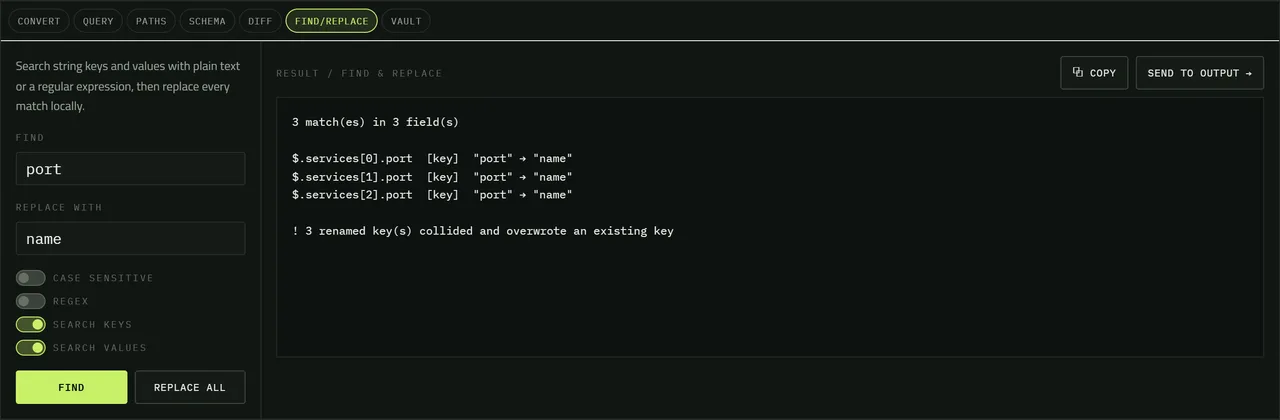
The find report for a rename that collides: three port keys renamed to name, three matches in three fields, and the warning that all three overwrote an existing key
The classic way a rename destroys data, counted before anything is written

NOTE Only strings are reachable. A number you want rewritten needs a conversion rather than a replacement, and because the walk covers the whole document a short pattern such as id will hit every key containing those two letters.

What you get on this page

  • ▸Search string values and optionally object keys
  • ▸Case-sensitive and regular expression modes
  • ▸Live match report with JSON paths
  • ▸Replace all matches and send the result back to the editor

Because bracekit is a static application, this page loads quickly, caches well and never sends your data to a parsing server. Your formatting preferences, recent documents and snippets stay in local storage.

ANSWERS

Find & Replace questions

Which parts of the JSON are searched?

String values are searched by default. Enable Search keys to also match object keys; numbers, booleans and null are left untouched.

Can I use regular expressions?

Yes. Turn on Regex and enter any valid JavaScript expression. Invalid expressions are reported without changing your document.

Is the replacement applied immediately?

No. Find only reports matches. Click Replace all to write the transformed document back into the input pane, then format or copy it as needed.

Does this upload my JSON?

No. Both search and replacement run locally in your browser.

Is my JSON data uploaded to a server?

No. Parsing, formatting, conversion, validation and comparison all run in your browser with JavaScript. Your data is never transmitted, and history is stored only in your local storage.

Is bracekit free to use?

Yes. Every tool is free, requires no account and has no usage limits. Once a page has been visited, the offline cache lets it reopen without a connection; only the Google Fonts files need the network, and system fonts are used while you are offline.

TOOL MATRIX

Keep working

Keyboard shortcuts
FORMATTING
Format input Ctrl/⌘ + Enter
Toggle auto-format Ctrl/⌘ + Shift + A
CLIPBOARD & FILES
Copy output Ctrl/⌘ + K
Open JSON file Ctrl/⌘ + O
Download output Ctrl/⌘ + S
Save snippet Ctrl/⌘ + Shift + N
MODULES
Open find & replace Ctrl/⌘ + Shift + F
Lock / unlock output Ctrl/⌘ + Shift + L
Show this dialog Ctrl/⌘ + /
Local history
Save snippet
Erase local data

Nothing is stored in this browser yet.

Removes the saved draft, history, snippets and formatting options for this site. Documents you typed stay in the editor until the page reloads.