JSON / JSON REPAIR

JSON Repair Tool

Fix invalid JSON with comments, trailing commas, unquoted keys, single quotes and Python-style literals using a browser-side repair engine. Processing happens locally in your browser, with no account and no uploads.

JSON formatting workbench

workspace.json — live session
INDENT
SORT
01 / RAW INPUT 0 LINES · 0 B
02 / FORMATTED OUTPUT 0 LINES · 0 B
Awaiting input ⌘/CTRL + ↵ TO FORMAT
RESULT / CONVERT
// Result will appear here
HOW IT WORKS

What gets fixed, and what no tool can guess.

Repair is a heuristic pass over the source text, not a re-serialisation of a parsed value: it runs before JSON.parse, so it can rescue text that would never have parsed. String literals are masked out first, which is what keeps the fixes from reaching inside your data.

Broken inputWhat happens to it
// note, /* block */Comment removed, surrounding structure untouched
{ "a": 1, }Trailing comma dropped
{ a: 1 }Unquoted key quoted
{ 'a': 1 }Single quotes converted, inner quotes escaped
True, None, undefined, NaNtrue, null, null, null
+.5, 1., 0x1f0.5, 1, 31

The part that is not rule-based

Repair does not invent a value, does not choose between two duplicate keys (the last one wins and you are warned), and does not decide whether a bare token was meant to be a string or a number. Anything the rules cannot settle falls through to jsonrepair, which reconstructs structure — unbalanced brackets, concatenated objects, fragments of a truncated stream — and the status bar says which path produced the result.

jsonrepair is also coarser about numbers than the text pass above: run the Repair module on 0x1f and it arrives as the string "0x1f", on 1. as 1.0, and on NaN as the string "NaN" — valid JSON, but not the type you meant. The formatter's repair pass is the one that rewrites those to 31, 1 and null.
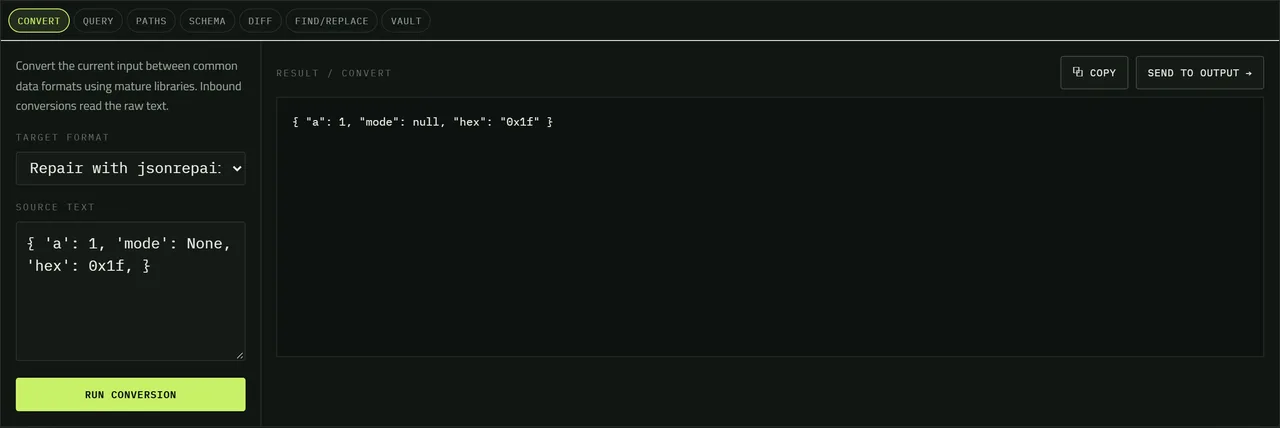
The Repair module turning single-quoted keys, a Python None and a hex literal into { "a": 1, "mode": null, "hex": "0x1f" } — the hex kept as a string, exactly as the copy warns
jsonrepair rescues the structure and quotes what it cannot prove is a number

NOTE Every repair is reported. If a fix changed meaning, you are told what was touched rather than quietly handed different data.

What you get on this page

  • ▸Strip line and block comments
  • ▸Remove trailing commas
  • ▸Quote bare object keys
  • ▸Convert True, False, None and undefined
  • ▸Fallback to jsonrepair for badly broken input

Because bracekit is a static application, this page loads quickly, caches well and never sends your data to a parsing server. Your formatting preferences, recent documents and snippets stay in local storage.

ANSWERS

JSON Repair questions

What syntax errors can be repaired?

Common issues include comments, trailing commas, unquoted keys, single-quoted strings, smart quotes, Python literals and non-standard numbers.

What if the document is severely broken?

The workbench falls back to jsonrepair, a mature repair library, before reporting a final parse error.

Can I disable automatic repairs?

Yes. Turn off Repair or enable Strict mode to see the original parsing error without normalization.

Is my JSON data uploaded to a server?

No. Parsing, formatting, conversion, validation and comparison all run in your browser with JavaScript. Your data is never transmitted, and history is stored only in your local storage.

Is bracekit free to use?

Yes. Every tool is free, requires no account and has no usage limits. Once a page has been visited, the offline cache lets it reopen without a connection; only the Google Fonts files need the network, and system fonts are used while you are offline.

TOOL MATRIX

Keep working

Keyboard shortcuts
FORMATTING
Format input Ctrl/⌘ + Enter
Toggle auto-format Ctrl/⌘ + Shift + A
CLIPBOARD & FILES
Copy output Ctrl/⌘ + K
Open JSON file Ctrl/⌘ + O
Download output Ctrl/⌘ + S
Save snippet Ctrl/⌘ + Shift + N
MODULES
Open find & replace Ctrl/⌘ + Shift + F
Lock / unlock output Ctrl/⌘ + Shift + L
Show this dialog Ctrl/⌘ + /
Local history
Save snippet
Erase local data

Nothing is stored in this browser yet.

Removes the saved draft, history, snippets and formatting options for this site. Documents you typed stay in the editor until the page reloads.