JSON / JSON MINIFY

JSON Minifier

Compress JSON into a single line, remove unnecessary whitespace and prepare compact payloads for APIs and configuration files. Processing happens locally in your browser, with no account and no uploads.

JSON formatting workbench

workspace.json — live session
INDENT
SORT
01 / RAW INPUT 0 LINES · 0 B
02 / FORMATTED OUTPUT 0 LINES · 0 B
Awaiting input ⌘/CTRL + ↵ TO FORMAT
HOW IT WORKS

The same document with the air removed.

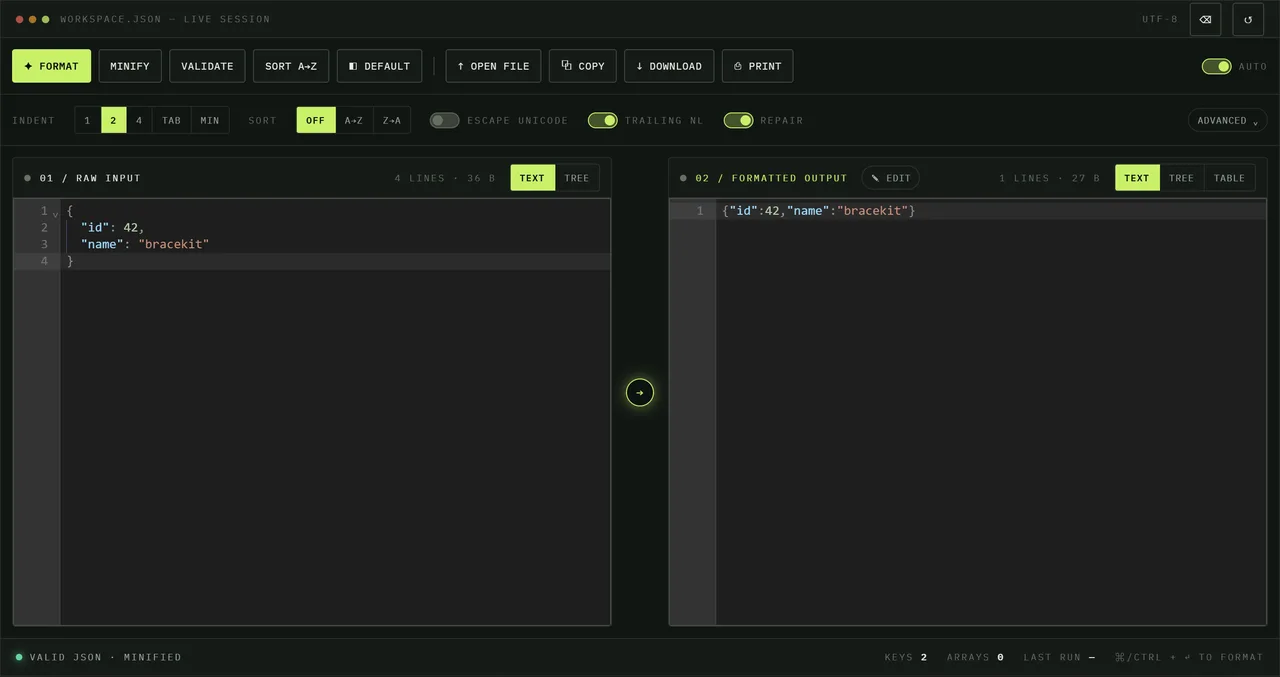
Minification drops the whitespace that sits between tokens. Keys, values, order and nesting are untouched, so the compact form parses to exactly the same value as the pretty one.

Pretty — 36 characters
{
  "id": 42,
  "name": "bracekit"
}
Minified — 27 characters
{"id":42,"name":"bracekit"}
The minifier reducing the pretty example to {"id":42,"name":"bracekit"} while the status bar confirms valid JSON minified
Thirty-six characters of indentation go, twenty-seven characters of data stay

Where the savings come from

They scale with the whitespace the input carried. A hand-indented configuration or a pretty-printed fixture shrinks a lot; a payload that was already compact barely moves. Indentation multiplied by depth is where the bytes are, not the data itself.

  • ▸It cannot shorten keys or string contents, because those are the document.
  • ▸It does not sort, deduplicate or otherwise restructure — that is the formatter's job.
  • ▸Broken input is not minified into more broken output: the repair pass runs first, so a trailing comma disappears instead of surviving.

NOTE Minified is still valid JSON. Anything that read the pretty file reads this one, which is why compact payloads go into request bodies and fixtures while the indented version stays in version control.

What you get on this page

  • ▸One-click minification
  • ▸Repair before minifying
  • ▸Copy or download compact output
  • ▸No character limits or uploads

Because bracekit is a static application, this page loads quickly, caches well and never sends your data to a parsing server. Your formatting preferences, recent documents and snippets stay in local storage.

ANSWERS

JSON Minify questions

What does minifying JSON do?

Minification removes whitespace and line breaks while preserving the meaning of the document, producing a smaller single-line payload.

Will minification change my values?

No. Only formatting whitespace is removed. Keys, strings, numbers and nesting remain semantically identical.

Can I minify JSON with comments?

Yes. With Repair enabled the tool strips comments and fixes common syntax issues before producing compact output.

Is my JSON data uploaded to a server?

No. Parsing, formatting, conversion, validation and comparison all run in your browser with JavaScript. Your data is never transmitted, and history is stored only in your local storage.

Is bracekit free to use?

Yes. Every tool is free, requires no account and has no usage limits. Once a page has been visited, the offline cache lets it reopen without a connection; only the Google Fonts files need the network, and system fonts are used while you are offline.

TOOL MATRIX

Keep working

Keyboard shortcuts
FORMATTING
Format input Ctrl/⌘ + Enter
Toggle auto-format Ctrl/⌘ + Shift + A
CLIPBOARD & FILES
Copy output Ctrl/⌘ + K
Open JSON file Ctrl/⌘ + O
Download output Ctrl/⌘ + S
Save snippet Ctrl/⌘ + Shift + N
MODULES
Open find & replace Ctrl/⌘ + Shift + F
Lock / unlock output Ctrl/⌘ + Shift + L
Show this dialog Ctrl/⌘ + /
Local history
Save snippet
Erase local data

Nothing is stored in this browser yet.

Removes the saved draft, history, snippets and formatting options for this site. Documents you typed stay in the editor until the page reloads.