JSON / JSONPATH

JSONPath Query Online

Query JSON with full JSONPath expressions using jsonpath-plus, including filters, wildcards, indexes and recursive descent. Processing happens locally in your browser, with no account and no uploads.

JSON formatting workbench

workspace.json — live session
INDENT
SORT
01 / RAW INPUT 0 LINES · 0 B
02 / FORMATTED OUTPUT 0 LINES · 0 B
Awaiting input ⌘/CTRL + ↵ TO FORMAT
RESULT / CONVERT
// Result will appear here
HOW IT WORKS

One expression instead of a walk function.

Queries run through JSONPath Plus, with the built-in subset parser as the offline path. Results always come back as a list and are printed one per --- separator, so an empty pane genuinely means no matches.

ExpressionSelects
$.store.book[*].authorevery author in the book array
$..priceevery price, at any depth
$.orders[?(@.total > 100)]orders above a threshold
$..items[?(@.sku.includes("A-"))]items whose sku contains A-
$.services[-1:]the last service in the sample above the panel — as a slice, because a bare [-1] matches nothing here
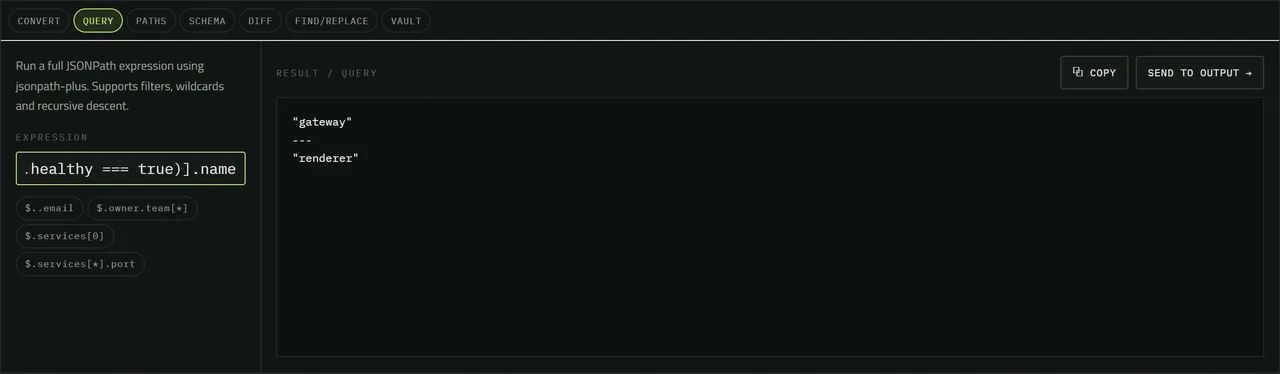
The query module answering the prefilled filter with two matches, gateway and renderer, separated by the --- marker the page documents
The expression that ships in the box, answered with the two healthy services

What the offline subset covers

Dot and bracket keys, indices including negative ones, wildcards, recursive descent, and single-condition filters using ==, =, !=, >, <, >=, <= and =~. The right-hand side of a filter is read as a number, boolean or null when it looks like one, otherwise as a string. Slices, script expressions and functions belong to the library path.

Only a thrown expression drops you onto that path, and the two engines disagree about what throws. =~ is rejected by the library and so is answered by the subset, which is why it works here; a bare [-1] is accepted by the library and returns nothing, so the subset never gets the chance to resolve it. When an answer looks worse than the expression, open the console and see which engine replied. The JSONPath cheat sheet lists every form that fails this way, with the replacement for each.

NOTE Recursive descent returns the value it finds without unpacking it: $..tags gives you the arrays, not their individual items.

What you get on this page

  • ▸Powered by jsonpath-plus
  • ▸Dot and bracket notation
  • ▸Filters such as @.price > 10
  • ▸Recursive descent with ..

Because bracekit is a static application, this page loads quickly, caches well and never sends your data to a parsing server. Your formatting preferences, recent documents and snippets stay in local storage.

ANSWERS

JSONPath questions

Which JSONPath features are supported?

The tool uses jsonpath-plus, so dot notation, bracket notation, wildcards, slices, indexes, filters and recursive descent are supported.

Can I query a value inside arrays?

Yes. For example $.services[?(@.healthy === true)].name returns the names of healthy services.

Does this run locally?

Yes. Your JSON and query never leave the browser.

Is my JSON data uploaded to a server?

No. Parsing, formatting, conversion, validation and comparison all run in your browser with JavaScript. Your data is never transmitted, and history is stored only in your local storage.

Is bracekit free to use?

Yes. Every tool is free, requires no account and has no usage limits. Once a page has been visited, the offline cache lets it reopen without a connection; only the Google Fonts files need the network, and system fonts are used while you are offline.

TOOL MATRIX

Keep working

Keyboard shortcuts
FORMATTING
Format input Ctrl/⌘ + Enter
Toggle auto-format Ctrl/⌘ + Shift + A
CLIPBOARD & FILES
Copy output Ctrl/⌘ + K
Open JSON file Ctrl/⌘ + O
Download output Ctrl/⌘ + S
Save snippet Ctrl/⌘ + Shift + N
MODULES
Open find & replace Ctrl/⌘ + Shift + F
Lock / unlock output Ctrl/⌘ + Shift + L
Show this dialog Ctrl/⌘ + /
Local history
Save snippet
Erase local data

Nothing is stored in this browser yet.

Removes the saved draft, history, snippets and formatting options for this site. Documents you typed stay in the editor until the page reloads.