JSONPath cheat sheet: expressions that work
25 NOVEMBER 2026 · 9 MIN READ
JSONPath has no single specification, so a cheat sheet is only worth as much as the engine behind it. The query tool runs JSONPath Plus with every answer wrapped in an array — these expressions and these failures are what that produces.
There are at least four dialects of JSONPath in circulation, and they disagree about filters, negative indexes and whether a missing key is an error. Rather than translate the RFC drafts, this page lists what the query tool actually returns: JSONPath Plus, called with wrap: true, so the result is always a list even when one node matched. Every expression below was run against the document at the bottom of this section — the same one the page loads — and the failures are listed with the rest, because they are the part that costs an afternoon.
{
  "project": "Aurora API",
  "owner": { "name": "Mira Chen", "email": "mira@example.dev",
            "team": ["platform", "developer-experience"] },
  "services": [
    { "name": "gateway",  "port": 8080, "healthy": true },
    { "name": "indexer",  "port": 8081, "healthy": false },
    { "name": "renderer", "port": 8082, "healthy": true }
  ]
}
Navigation
| Expression | Returns |
|---|---|
$ | the whole document, inside an array |
$.project | ["Aurora API"] |
$['owner']['name'] | bracket form, needed for keys with spaces or dots |
$.services[0].name | ["gateway"] |
$.services[*].name | all three names |
$.services.* | each service object |
$..name | the owner name plus every service name — recursive descent matches the key at any depth |
$..services..name | descent can be chained; here it lands back on the same three |
$..email | every value stored under email, however deeply buried |
$..* | every value in the document — useful, rarely readable |
$.services.length | [3] |
$..['name','email'] | a union of two keys applied across the tree |
Filters
A filter is ?( expression ) and the expression is real JavaScript with @ bound to the candidate. That is the most useful part of the language and the part most people write wrong, because they reach for the textbook operators instead of the methods the language already has.
| Expression | Returns |
|---|---|
$.services[?(@.healthy)].name | truthiness — gateway, renderer |
$.services[?(@.healthy === true)].name | the same, written explicitly; use ===, since == in this dialect is a comparison too |
$.services[?(@.port > 8080)].name | indexer, renderer |
$.services[?(@.port >= 8081 && @.healthy)].name | renderer only — && and || both work |
$.services[?(@.port % 2 === 0)].name | arithmetic in the comparison is fine |
$.services[?(@.name.includes('i'))].name | substring — indexer |
$.services[?(@.name.startsWith('g'))].name | prefix |
$.services[?(@.name.match(/^i/))].name | regex against the field |
$.services[?(/^i/.test(@.name))].name | the same regex, written the other way round |
$.owner.team[?(@ === 'platform')] | for a scalar array, @ is the item itself |
$.owner.team[?(@.length > 8)] | length works on a string too |
$.services[?(typeof @.name === 'string')].name | guards against records missing the field |
Slices and unions
- ▸
$.services[0,2].name— a comma-separated list of indexes. - ▸
$.services[1:].nameand$.services[:1].name— open-ended slices behave as they do in JavaScript. - ▸
$.services[-2:].name— a negative index inside a slice is the supported way to count from the end. - ▸
$..['name','email']— a key union, which can be combined with descent to pull the same fields out of every record.
Expressions that return nothing, or throw
| Written | What happens | Write instead |
|---|---|---|
$.services[-1].name | an empty result — a bare negative index is not part of this dialect | $.services[-1:].name |
$.services[#-1].name | rejected: Unexpected #. The # counter is from an older grammar | $.services[-1:].name |
$.services[?@.healthy].name | an empty result; the unparenthesised filter does not parse into anything | $.services[?(@.healthy)].name |
$.services[?(@.name)].length | empty — length attaches to an array path, not to a filter result | count the rows after the query |
$..[('name','email')] | throws: the parenthesised union is a different dialect | $..['name','email'] |
$.services[?(@.name =~ /^i/)] | throws: Invalid left-hand side in assignment — =~ is not this engine's operator | $.services[?(@.name.match(/^i/))] |
$.services[?(@.name === search(/^i/, 'x'))] | search is not defined in the sandboxed expression scope | use .match() |
$.services[*][?(@.healthy)] | empty — a wildcard followed by a filter does not chain here | $.services[?(@.healthy)] |
$.missing.anything | an empty result, never an error | nothing — that silence is the point |
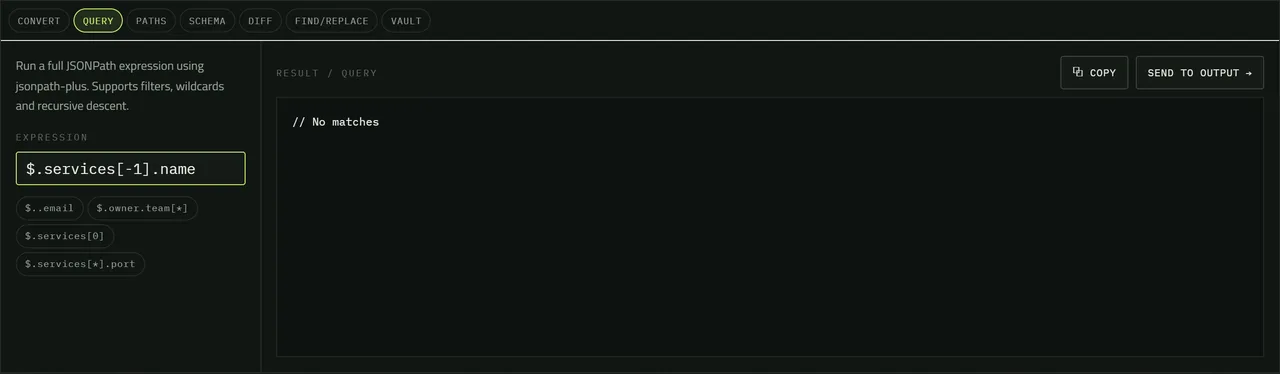
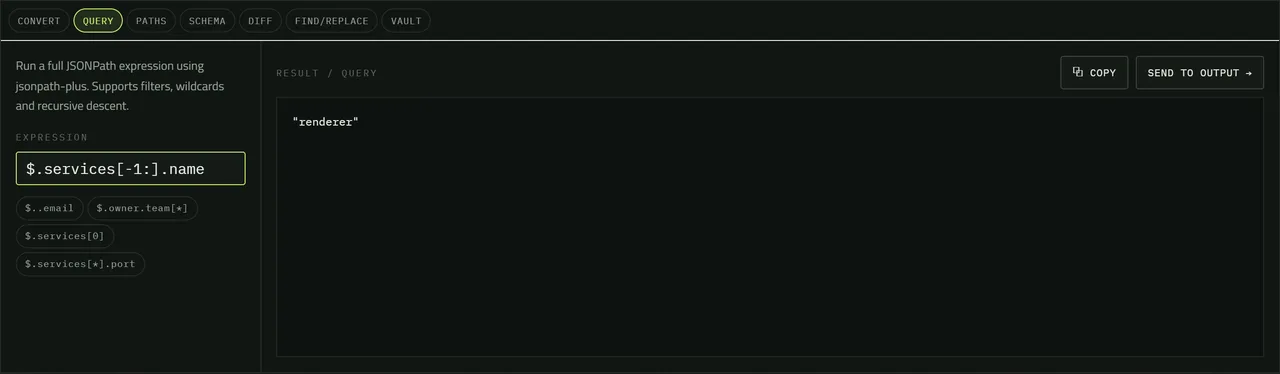
Why a rejected expression can still show results
The query module keeps a second, smaller engine for the case where the primary one cannot load. When an expression throws, evaluation falls through to that subset, which implements dotted paths, [0], [*], ..key and single-comparison filters — and, confusingly, accepts a bare negative index and the quoted =~ form the primary engine rejects. So an answer can come from either place, and the two are not identical. The signal is the browser console: it records which expression was refused. If a filter “works” but behaves oddly, assume it was answered by the fallback and rewrite it in the plain forms listed above — dotted paths, comparisons and .includes() are the subset both engines agree on.
Recipes that cover most real work
- 01 Every value of a key, anywhere:
$..email. This is the single most useful expression in the language and the reason JSONPath beats hand-written loops for exploration. - 02 Records matching a condition:
$.services[?(@.healthy === false)]— filter on the array, then read the fields you want off the result. - 03 One field from every record:
$.services[*].port, or$..services..portwhen the array might be nested under something you do not know yet. - 04 The shape of a repeated record:
$.services[0]gives one full object, which is usually the better thing to paste into schema inference than the whole list. - 05 Everything under a subtree:
$.owner..*— a quick way to list values when a document came from an API you do not trust. - 06 Working the other way: in tree mode, select a node and use the selection menu's Copy path action to get the exact expression for it, then trim the last step into a filter.
NOTE Results are always a list. $.project gives ["Aurora API"], not "Aurora API", and a miss gives [] rather than an error. Anything you do with the output — counting, exporting, comparing — should assume a list of zero or more matches, which is also why an expression that looks right and returns [] is the failure mode to watch for.