CSV type inference: why zip codes lose zeros
25 NOVEMBER 2026 · 8 MIN READ
Turning CSV into JSON means guessing whether <code>007</code> is a number, a code or a version. The guess is made by one small function, its rules are knowable, and every failure it produces is the same shape: text that looked like a number stops being text.
CSV is a quoting rule and nothing else. There are no types, no lengths, no encoding declaration and no way to say "this column is an identifier that happens to be written with digits". So a CSV-to-JSON converter has to infer, and inference is where the data changes. The conversion here runs the type guess on every cell; understanding its five rules turns a mystery into a checklist.
The rules, in order
- 01
true,TRUE,false,FALSEbecome booleans. Mixed case such asTruestays the string it is. - 02 Anything matching
-?then digits with an optional fraction and an optional exponent, with surrounding spaces allowed, becomes a number — but only if the result stays below 2^53 in magnitude. - 03 A full ISO 8601 timestamp with a time component becomes a date, which then serialises back in UTC.
- 04 An empty cell becomes
null. - 05 Everything else stays a string, including
nullwritten as text, which you cannot tell apart from a real null.
zip,qty,longid,version,ts,phone,money
007,42,12345678901234567890,1.2.3,2026-11-24T09:30:00+02:00,555-1234,-1,234.50

-> [{"zip":7,"qty":42,"longid":"12345678901234567890","version":"1.2.3",
    "ts":"2026-11-24T07:30:00.000Z","phone":"555-1234","money":-1}]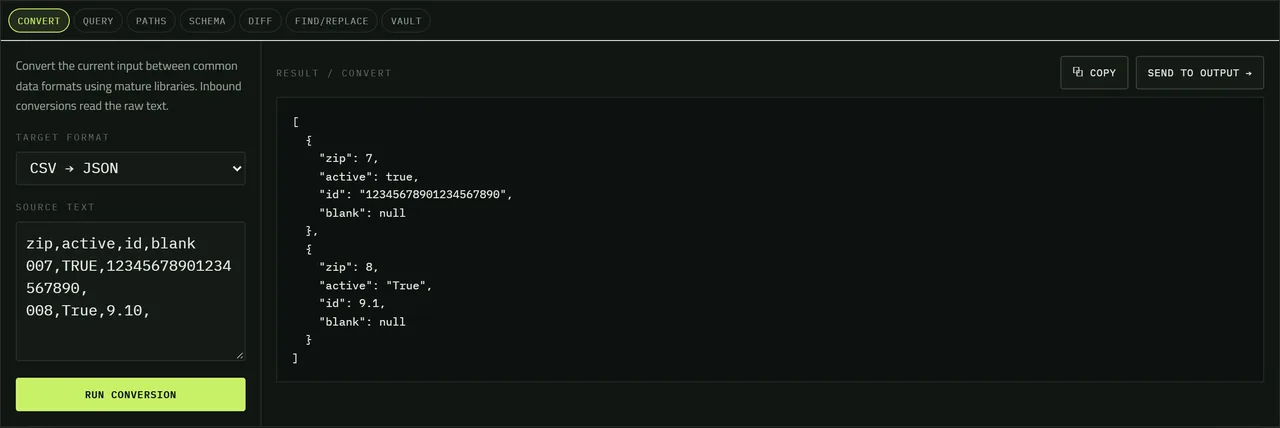
What each column teaches
| Cell | Result | Reason |
|---|---|---|
007 | 7 | matches the number shape and is small; the zeros were never part of a number — the classic lost postal code, extension and version file |
3.50 | 3.5 | a number has no memory of trailing precision; money should be an integer minor unit or a string |
12345678901234567890 | unchanged text | above 2^53, so the converter refuses to make it a number and keeps the digits |
1e3 | 1000 | scientific notation is in the pattern, so a code that starts with a digit and contains e can be rewritten |
+7 | "+7" | a leading plus is not in the pattern, so it survives by accident rather than by design |
1.2.3 | "1.2.3" | two dots do not parse; semver is safe for the wrong reason |
0x10 | "0x10" | hex is not JSON-shaped, so it stays text |
-1,234.50 | -1 | the thousands separator is a field delimiter, so the value splits and the remainder is discarded — quote the cell or drop the separator |
2026-11-24 | the same string | a date with no time does not match the timestamp pattern |
2026-11-24T09:30:00+02:00 | 2026-11-24T07:30:00.000Z | same instant, different spelling: the offset is normalised to UTC and milliseconds are added |
The part people blame the converter for
Two of the failures above are not really the converter’s choice. The 20-digit id survives only because it is large; shrink it to 15 digits and it becomes a number with full precision. And the timestamp is converted correctly — it is the spelling that changed, which matters as soon as you diff the JSON against another export or a schema that expects [+-]\d\d:\d\d in the pattern. If a column must round-trip exactly as written, it must stay text, and text is only guaranteed when the value cannot be mistaken for a number.
Going the other way is worse
Export writes values with the minimum quoting that RFC 4180 allows, so a JSON string "007" lands in the file as bare 007 — and Excel, Numbers and Google Sheets will apply their own, more aggressive inference to it on open. Two further export behaviours are worth knowing: nested objects become dotted column names (owner.email), and arrays are joined, so [1, 2] is written as "1,2" inside quotes. A CSV export of nested JSON is a flattened projection, not a lossless archive.
Spreadsheets and formulas
A cell that begins with =, +, - or @ is a formula to a spreadsheet. A value such as =1+1 survives a JSON round trip untouched, and then evaluates the moment someone opens the export — which is both a data-integrity bug and the standard CSV-injection vector for anything a human later opens. Prefix the cell with a single quote or force the column to text in the import wizard; treat any export that mixes user text with spreadsheet consumers as needing that guard.
Keeping identifiers intact
- 01 Decide before converting which columns are identifiers, because after inference you cannot tell
007from7. - 02 Prefer JSON as the interchange format and CSV only as a human deliverable; the two conversions are not inverses of each other.
- 03 After importing, run schema inference over the rows: a zip column inferred as
integeris the warning you wanted before the data hit a database. - 04 For a column that must stay text, generate it as text at the source — most writers will quote it, but quoting is not preserved as a type hint.
- 05 Watch for ragged rows. A row with one field too many is reported as an error rather than truncated, which is the behaviour you want; a silent truncation of a money column is how
-1,234.50becomes-1in an archive nobody questions.
NOTE A header is only a name. Nothing in a CSV file tells a reader that id is a string, that zip has leading zeros or that ts is local time — every tool that opens the file invents those facts independently, and they will not all invent the same ones.