JSON / CSV TO JSON

CSV to JSON Converter

Turn CSV rows into JSON objects with PapaParse, including quoted fields, headers and automatic number/boolean detection. Processing happens locally in your browser, with no account and no uploads.

JSON formatting workbench

workspace.json — live session
INDENT
SORT
01 / RAW INPUT 0 LINES · 0 B
02 / FORMATTED OUTPUT 0 LINES · 0 B
Awaiting input ⌘/CTRL + ↵ TO FORMAT
RESULT / CONVERT
// Result will appear here
HOW IT WORKS

Spreadsheet columns become typed records.

Parsing runs Papa Parse with the first non-empty line as the header. Values are typed on the way in, which is the convenient part and the dangerous part in equal measure.

CellBecomes
42number 42
3.50number 3.5
1e5number 100000
TRUEboolean true
Truethe string "True" — only all-lowercase and all-uppercase spellings convert
nullthe string "null"
an empty cellnull
007number 7
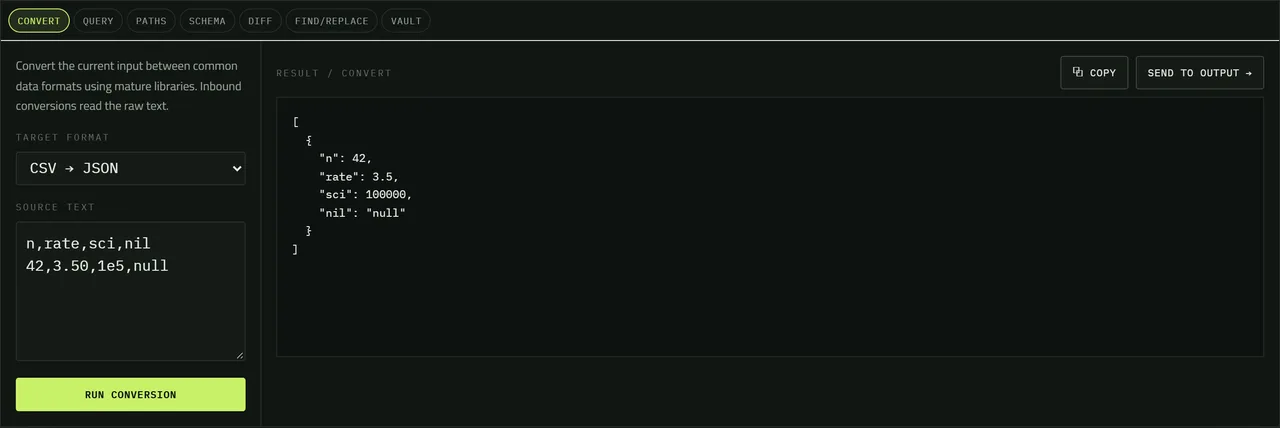
The converter reading four cells: 42 stays a number, 3.50 becomes 3.5, 1e5 becomes 100000, and the text null arrives as the string null
Four rows of the typing table, in one import

Columns that must not be typed

Anything with structure in its digits: zip codes, phone numbers, IBANs, product SKUs, account ids. 007 becomes 7 and a twenty-digit identifier is kept as text by the library precisely because it would not survive as a number — the built-in fallback converts it and loses the tail. Format those columns as text before exporting, or convert here and re-quote afterwards. The full rule set — what counts as a number, why 2026-11-24T08:00:00+02:00 arrives shifted to UTC — is in the CSV type inference guide.

NOTE Repeated header names are not merged. The offline fallback appends an underscore to each repeat (id, id_) so every value stays visible instead of the last column overwriting the first.

What you get on this page

  • ▸Powered by PapaParse
  • ▸Header row becomes object keys
  • ▸Quoted commas and newlines supported
  • ▸Automatic numeric and boolean inference

Because bracekit is a static application, this page loads quickly, caches well and never sends your data to a parsing server. Your formatting preferences, recent documents and snippets stay in local storage.

ANSWERS

CSV to JSON questions

What CSV format is expected?

The first row is treated as headers. Each following row becomes one JSON object with those header keys.

Are numbers converted to numbers?

Yes. PapaParse dynamic typing converts numeric, boolean and null-like values automatically.

Can I convert JSON back to CSV?

Yes. Select JSON → CSV in the Convert module on the JSON to CSV page.

Is my JSON data uploaded to a server?

No. Parsing, formatting, conversion, validation and comparison all run in your browser with JavaScript. Your data is never transmitted, and history is stored only in your local storage.

Is bracekit free to use?

Yes. Every tool is free, requires no account and has no usage limits. Once a page has been visited, the offline cache lets it reopen without a connection; only the Google Fonts files need the network, and system fonts are used while you are offline.

TOOL MATRIX

Keep working

Keyboard shortcuts
FORMATTING
Format input Ctrl/⌘ + Enter
Toggle auto-format Ctrl/⌘ + Shift + A
CLIPBOARD & FILES
Copy output Ctrl/⌘ + K
Open JSON file Ctrl/⌘ + O
Download output Ctrl/⌘ + S
Save snippet Ctrl/⌘ + Shift + N
MODULES
Open find & replace Ctrl/⌘ + Shift + F
Lock / unlock output Ctrl/⌘ + Shift + L
Show this dialog Ctrl/⌘ + /
Local history
Save snippet
Erase local data

Nothing is stored in this browser yet.

Removes the saved draft, history, snippets and formatting options for this site. Documents you typed stay in the editor until the page reloads.