JSON / JSON COMPARE

JSON Compare & Diff

Compare two JSON documents and see structural changes by path, including added, removed and modified values. Processing happens locally in your browser, with no account and no uploads.

JSON formatting workbench

workspace.json — live session
INDENT
SORT
01 / RAW INPUT 0 LINES · 0 B
02 / FORMATTED OUTPUT 0 LINES · 0 B
Awaiting input ⌘/CTRL + ↵ TO FORMAT
RESULT / CONVERT
// Result will appear here
HOW IT WORKS

Comparing values, not characters.

Both documents are parsed, then walked side by side. Re-indentation, key order and trailing whitespace therefore produce no differences at all, which is exactly what makes the report usable on two exports of the same object.

MarkerMeans
+Present in the second document only
-Present in the first document only
~Same path, different value — both sides are printed
Input pane (before)
{
  "version": 2,
  "tags": ["a", "b"]
}
Compare field (after)
{
  "version": 3,
  "tags": ["a"]
}

That pair reports ~ $.version: 2 → 3 and - $.tags[1]: "b": one changed scalar, one removed array element, each addressed by path instead of by line number.
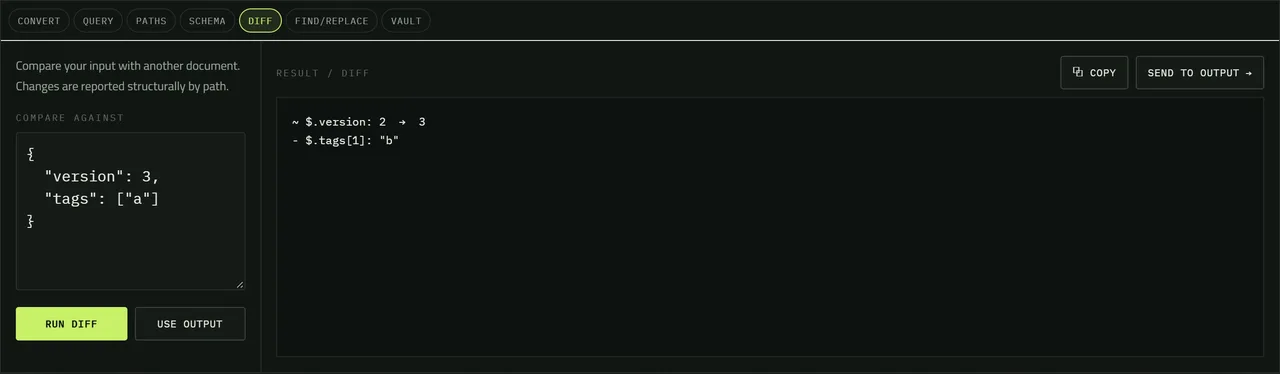
The diff module comparing the documented pair: one changed version and one removed array element, each reported by path with a marker
Two documents, one changed scalar and one missing element, addressed by path

Two things to keep in mind

  • ▸Arrays are positional. Insert one item at the front and every later index reads as changed, because a list entry has no identity to match on.
  • ▸1 and "1" are different values: a type change is reported as a change, not filtered out as noise.

What you get on this page

  • ▸Structural diff by JSON path
  • ▸Added, removed and changed value markers
  • ▸Compare against the current formatted output
  • ▸Local-only comparison

Because bracekit is a static application, this page loads quickly, caches well and never sends your data to a parsing server. Your formatting preferences, recent documents and snippets stay in local storage.

ANSWERS

JSON Compare questions

How does JSON Compare report differences?

It walks both documents and reports each change with a path, marking values as added, removed or changed.

Does array order matter?

Yes. Arrays are compared by index, so moving an item is shown as a change at the affected indexes.

Are both documents uploaded?

No. Comparison runs entirely in your browser.

Is my JSON data uploaded to a server?

No. Parsing, formatting, conversion, validation and comparison all run in your browser with JavaScript. Your data is never transmitted, and history is stored only in your local storage.

Is bracekit free to use?

Yes. Every tool is free, requires no account and has no usage limits. Once a page has been visited, the offline cache lets it reopen without a connection; only the Google Fonts files need the network, and system fonts are used while you are offline.

TOOL MATRIX

Keep working

Keyboard shortcuts
FORMATTING
Format input Ctrl/⌘ + Enter
Toggle auto-format Ctrl/⌘ + Shift + A
CLIPBOARD & FILES
Copy output Ctrl/⌘ + K
Open JSON file Ctrl/⌘ + O
Download output Ctrl/⌘ + S
Save snippet Ctrl/⌘ + Shift + N
MODULES
Open find & replace Ctrl/⌘ + Shift + F
Lock / unlock output Ctrl/⌘ + Shift + L
Show this dialog Ctrl/⌘ + /
Local history
Save snippet
Erase local data

Nothing is stored in this browser yet.

Removes the saved draft, history, snippets and formatting options for this site. Documents you typed stay in the editor until the page reloads.