NDJSON in practice: split, fix and ship logs
25 NOVEMBER 2026 · 8 MIN READ
The format argument is short; the working life of a JSON Lines file is where the time goes. A file that will not convert, a record that must be dropped, a sample that needs a schema and a bulk import that wants pairs — each has a small, repeatable fix.
The format comparison covers why one record per line is worth it. This page is the other half: what actually goes wrong in a real file, and the shortest path through it. Everything here assumes the one property that makes the format useful — a record never spans a line — which is also the property most often broken.
The conversion that fails first
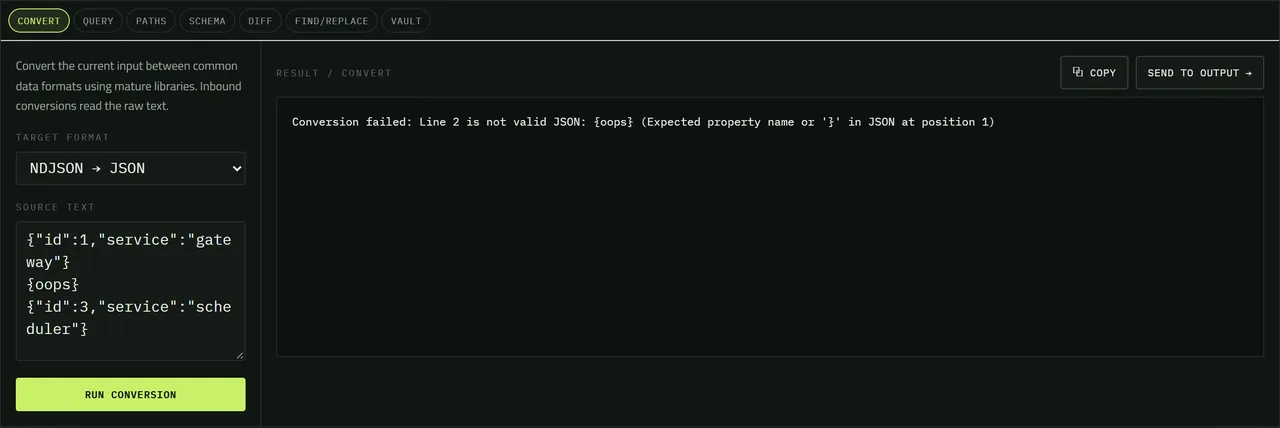
Paste a pretty-printed array of objects into NDJSON to JSON and the first line is { on its own: an incomplete value. The reader reports the line rather than swallowing it, which is the whole point of the format — one bad record must cost you one record, not the file.
input                          output
{"level":"info"}              Line 2 is not valid JSON: nope (Unexpected token 'o', "nope" is not valid JSON)
nope
{"level":"warn"}

{                              Line 1 is not valid JSON: { (Expected property name or '}' in JSON at position 1)
  "a": 1
}
Armed with a line number, the repair is mechanical. Delete the record and keep going, or keep it and fix it. In a shell that is sed -i '2d' app.ndjson; on a read-only file, grep -v the offender out or split the stream at the boundary:
head -n 1 app.ndjson  > good.ndjson
tail -n +3 app.ndjson >> good.ndjson
awk 'NF' app.ndjson > clean.ndjson   # drop blank lines
Recipes worth memorising
- 01 Take a sample.
head -n 500 app.ndjson > sample.ndjson. Converting a sample instead of the whole file is the difference between a two-second answer and a browser tab that never comes back. - 02 Filter without a converter. No decoding step is needed for a line stream:
jq -c 'select(.level == "error")' app.ndjsonemits NDJSON again, becausejqreads and writes a stream of values by default. - 03 Get the whole set in one value. Convert the file to an array, and every tool that wants a root document works: JSONPath over the collection, schema inference across all records, CSV for a spreadsheet, diff between two exports.
- 04 Count records honestly.
wc -lequals the record count only if every writer escaped the newlines inside its messages. One raw newline turns one record into two lines and the count into a lie; the check is that the number of lines equals the number of records the converter produced. - 05 Ship to a bulk API. Elasticsearch and OpenSearch want an action line before each document line — two lines per record, neither pretty-printed, and the payload has to end with a newline.
- 06 Rotate and concatenate. Compressed segments glue together:
zcat part-*.gz > all.ndjsonworks because each member is an independent byte stream that ends on a line boundary.
{"create":{"_index":"events"}}
{"ts":"2026-11-25T08:00:01Z","level":"info","msg":"boot"}
{"create":{"_index":"events"}}
{"ts":"2026-11-25T08:00:04Z","level":"warn","msg":"slow query"}
What actually breaks these files
| Symptom | Cause | Fix |
|---|---|---|
Line 1 fails on { | a pretty-printed array pasted as if it were lines | convert the array with JSON to NDJSON instead of minifying it |
| The last line is a fragment | the writer was interrupted mid-record | drop the trailing partial line; a truncated record is unrecoverable, the rest is fine |
| A blank line is reported | some writers emit one, most readers skip them | harmless here — blank lines are treated as framing, not records |
| Only the first line fails | a UTF-8 BOM at offset 0 | strip the BOM; every later record was fine |
| One record contains a raw newline | a message field serialised by hand rather than by a writer | escape it as \n at the producer; no reader can recover a line boundary that was never written |
| Two records on one line | a writer that used a comma instead of a newline | split on the boundary between } and {, then reconvert |
| Every line starts with a timestamp | a log prefix before the JSON body | cut the prefix off per line — sed 's/^.*\] //' — and then treat the remainder as records |
| Numbers in ids changed shape | each line parses as JSON, so doubles apply | identifiers must be quoted by the writer; see the precision guide |
Both directions
Array to lines writes one compact record per line and terminates the file with a newline, which is what most importers expect. It accepts a non-array root and writes it as a single line, and it handles scalar arrays, so [1, "x", null] becomes three lines — legal NDJSON even though it looks odd. Going back, lines to an array gives you one document out of many, and the conversion is not symmetric: a pretty-printed input is not “the same file with different spacing”, it is a different number of records. When in doubt, convert to an array, inspect it in tree form, and convert out again — that round trip shows you whether the line boundaries were where you thought they were.
NOTE If the file is not JSON at all but a key=value log, NDJSON is still the right destination: parse into records with a script, emit one object per line, and the whole toolchain above — sampling, filtering, schema inference, CSV — becomes available without writing a parser for each job.