JSON / JSON TO NDJSON

JSON to NDJSON Converter

Convert JSON arrays into newline-delimited JSON, one object per line, ready for logs and streaming pipelines. Processing happens locally in your browser, with no account and no uploads.

JSON formatting workbench

workspace.json — live session
INDENT
SORT
01 / RAW INPUT 0 LINES · 0 B
02 / FORMATTED OUTPUT 0 LINES · 0 B
Awaiting input ⌘/CTRL + ↵ TO FORMAT
RESULT / CONVERT
// Result will appear here
HOW IT WORKS

One record per line, so tools can stream it.

NDJSON, also called JSON Lines, writes a complete JSON value on every line with no wrapping array. grep, wc -l, jq, log shippers, warehouse loaders and the Elasticsearch bulk API all read this shape; none of them can consume a pretty-printed array incrementally.

JSON
[
  { "id": 1, "ok": true },
  { "id": 2, "ok": false }
]
NDJSON
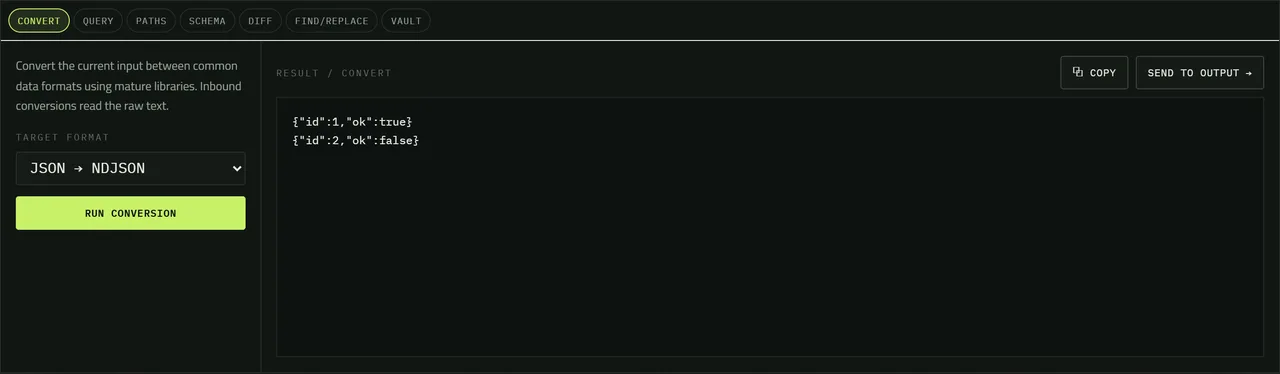
{"id":1,"ok":true}
{"id":2,"ok":false}
The converter writing the two-record example as exactly two NDJSON lines, each a complete JSON value with no wrapping array
A pretty array in, two self-contained lines out

Rules that keep the file usable

  • ▸Every line has to stand on its own. A value containing a newline is escaped by the serialiser, so the record still occupies exactly one line.
  • ▸Indentation on the way in does not matter. The document is parsed before it is split, so a pretty-printed array still becomes one line per record; the wrapper is dropped because NDJSON has none.
  • ▸Any value is legal, not only objects: a file of bare strings and numbers is valid NDJSON, which is why a scalar appears quoted on its own line.
  • ▸Appending is the whole point. A writer adds a line without reading or rewriting the file, and a reader can stop at any line boundary.

NOTE There is no top-level type to inspect, so a consumer cannot tell an empty file from a file with one record without counting lines. That is the trade for being streamable.

What you get on this page

  • ▸One compact JSON value per line
  • ▸Arrays and single objects both supported
  • ▸No server-side processing
  • ▸Reverse NDJSON → JSON available

Because bracekit is a static application, this page loads quickly, caches well and never sends your data to a parsing server. Your formatting preferences, recent documents and snippets stay in local storage.

ANSWERS

JSON to NDJSON questions

What is NDJSON?

NDJSON stores one JSON value on each line, which makes it easy to stream and append without parsing the whole file at once.

How are arrays converted?

Each array element becomes one line. A single object is emitted as a one-line document.

Can I convert NDJSON back to JSON?

Yes. Select NDJSON → JSON in the Convert module and paste the lines into the Source text box.

Is my JSON data uploaded to a server?

No. Parsing, formatting, conversion, validation and comparison all run in your browser with JavaScript. Your data is never transmitted, and history is stored only in your local storage.

Is bracekit free to use?

Yes. Every tool is free, requires no account and has no usage limits. Once a page has been visited, the offline cache lets it reopen without a connection; only the Google Fonts files need the network, and system fonts are used while you are offline.

TOOL MATRIX

Keep working

Keyboard shortcuts
FORMATTING
Format input Ctrl/⌘ + Enter
Toggle auto-format Ctrl/⌘ + Shift + A
CLIPBOARD & FILES
Copy output Ctrl/⌘ + K
Open JSON file Ctrl/⌘ + O
Download output Ctrl/⌘ + S
Save snippet Ctrl/⌘ + Shift + N
MODULES
Open find & replace Ctrl/⌘ + Shift + F
Lock / unlock output Ctrl/⌘ + Shift + L
Show this dialog Ctrl/⌘ + /
Local history
Save snippet
Erase local data

Nothing is stored in this browser yet.

Removes the saved draft, history, snippets and formatting options for this site. Documents you typed stay in the editor until the page reloads.