JSON / XML TO JSON

XML to JSON Converter

Parse XML into JSON with fast-xml-parser, preserving attributes and text nodes with predictable @ and #text conventions. Processing happens locally in your browser, with no account and no uploads.

JSON formatting workbench

workspace.json — live session
INDENT
SORT
01 / RAW INPUT 0 LINES · 0 B
02 / FORMATTED OUTPUT 0 LINES · 0 B
Awaiting input ⌘/CTRL + ↵ TO FORMAT
RESULT / CONVERT
// Result will appear here
HOW IT WORKS

Attributes, text and repetition — mapped.

Parsing uses fast-xml-parser with attributes enabled. An attribute becomes a key prefixed with @, element text becomes #text, and two siblings that share a name become an array. Everything else keeps document order.

XML
<order id="7">
  <price currency="USD">12.50</price>
  <item>a</item>
  <item>b</item>
</order>
JSON
{
  "order": {
    "price": { "#text": 12.5, "@currency": "USD" },
    "item": ["a", "b"],
    "@id": "7"
  }
}
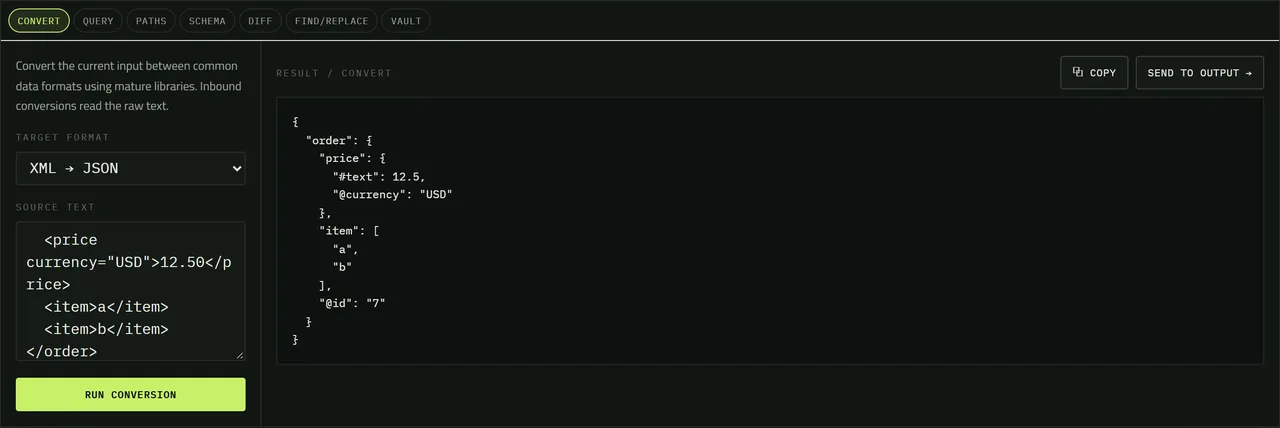
The converter reading an order element: the id attribute arrives as @id, the price text as the number 12.5 beside @currency, and two item siblings as an array
The XML example above, attributes prefixed and text inferred

Three asymmetries to expect

  • ▸Element text is type-inferred — 12.50 arrived as the number 12.5 — while attribute values stay strings, which is why @id is quoted.
  • ▸A single <item> produces an object rather than a one-element array, so code written against a list breaks the first time a feed contains one entry.
  • ▸Mixed content folds the loose text into #text next to the child keys instead of preserving where it appeared.

NOTE Malformed XML fails with the parser's own message; the offline fallback uses the browser's XML parser and reports the first line of its error. Neither one guesses at a missing close tag.

What you get on this page

  • ▸Powered by fast-xml-parser
  • ▸Attributes prefixed with @
  • ▸Text nodes stored as #text
  • ▸Repeated elements become arrays

Because bracekit is a static application, this page loads quickly, caches well and never sends your data to a parsing server. Your formatting preferences, recent documents and snippets stay in local storage.

ANSWERS

XML to JSON questions

How are XML attributes represented?

Attributes are stored as keys prefixed with @, for example @id.

What happens to text content?

Text content is stored under #text when an element also has attributes or children.

Is invalid XML reported?

Yes. fast-xml-parser validates the document and reports the parsing problem.

Is my JSON data uploaded to a server?

No. Parsing, formatting, conversion, validation and comparison all run in your browser with JavaScript. Your data is never transmitted, and history is stored only in your local storage.

Is bracekit free to use?

Yes. Every tool is free, requires no account and has no usage limits. Once a page has been visited, the offline cache lets it reopen without a connection; only the Google Fonts files need the network, and system fonts are used while you are offline.

TOOL MATRIX

Keep working

Keyboard shortcuts
FORMATTING
Format input Ctrl/⌘ + Enter
Toggle auto-format Ctrl/⌘ + Shift + A
CLIPBOARD & FILES
Copy output Ctrl/⌘ + K
Open JSON file Ctrl/⌘ + O
Download output Ctrl/⌘ + S
Save snippet Ctrl/⌘ + Shift + N
MODULES
Open find & replace Ctrl/⌘ + Shift + F
Lock / unlock output Ctrl/⌘ + Shift + L
Show this dialog Ctrl/⌘ + /
Local history
Save snippet
Erase local data

Nothing is stored in this browser yet.

Removes the saved draft, history, snippets and formatting options for this site. Documents you typed stay in the editor until the page reloads.